Data security
Learn about how to ensure data security in your Exasol deployment.
Introduction
Architecture overview
Exasol is deployed as a Linux application on hosts in your own infrastructure or in a cloud environment. An Exasol database runs in a cluster of one or more nodes. Each node is a virtual or physical host with one or more network interfaces.
Data is stored in data volumes that can be located on local or remote storage services. Database backups are stored on backup volumes, which can also be located either in the cluster or on remote storage.
System administrators can interact with the cluster through different APIs during and after the deployment process. Database clients and other tools can have various degrees of access to the database and to system functionality such as authentication and file management.
Keep your data secure
To prevent unauthorized access to the cluster and the database and keep your data safe, make sure that you follow the guidelines for system and network security in this documentation. Also make sure that you understand the procedures for managing database access through SQL.
General best practices to keep your data secure
-
Keep your Exasol deployment updated. Check the release notes regularly and apply security updates without delay.
-
Follow our guidelines for hardening the operating system in your Exasol cluster.
-
Use encryption to secure data both when transferred through the network (data in motion) and when stored on a disk (data at rest).
-
Use file encryption to protect database backups.
-
Grant users and applications that access Exasol only the minimum permissions necessary to perform their specific roles (principle of least privilege).
-
Protect secrets such as passwords and access tokens. Store them in secret stores, never commit them to source control, and do not share them across users and environments.
-
Distinguish between human users and machine users (technical users). Never use access credentials of individual human users for automated processes.
-
Regularly rotate access credentials used by machine users.
-
Audit sessions and monitor the system and database logs regularly.
-
Follow best practices and guidelines for data security set out by your own organization.
-
For more details about the architecture of Exasol databases, see Architecture overview.
-
To learn more about the APIs and the Admin UI in Exasol, see Administration interfaces.
Product life cycle
Release streams and updates
Exasol regularly rolls out security updates for the supported releases in the LTS (long term support) and Innovation release streams. The changes in each release are described in the Release notes and Changelogs sections in this documentation.
To learn more about the different release streams, see Exasol release streams.
Updates
All supported Exasol versions are available for download on the Exasol Download Portal.
In as-application deployments, system updates can be performed either from the command line or using Exasol Admin (depending on the Exasol version). For more information, see Update Exasol.
Exasol SaaS deployments can be updated either automatically or manually from the web console. To learn more, see Automated updates.
End of life (EOL)
When a version of Exasol reaches end-of-life (EOL) there are no more software updates, investigations, or bugfixes for that version. Incidents that occur on a version that has reached EOL will not be processed or resolved, and no SLAs are applicable in these cases. For this reason, we strongly recommend that you only run supported versions of Exasol.
To learn more, see Exasol release streams and Exasol life cycle policy.
Authentication
System authentication
System users/administrators in Exasol can authenticate with a username and password. System users are created using the ConfD API.
For more details, see Add users.
Database authentication
Database users are created and managed using data definition language (DDL) SQL statements.
Database users can use either LDAP, Kerberos SSO, OpenID, or a password for authentication. Multi-factor authentication (MFA) can be used if supported by the authentication provider.
For more details about authentication methods, see CREATE USER and ALTER USER.
Access control
System access
The administrative tasks a user can do in Exasol depends on the group the user belongs to. A user must belong to at least one primary group, and can belong to one or more secondary groups. Exasol has the following predefined groups:
| Group | Description |
|---|---|
| exaadm | Exasol system administrator |
| exabfsadm | Exasol BucketFS administrator |
| exadbadm | Exasol database administrator |
| exastoradm | Exasol storage administrator |
| exausers | Exasol users |
| root | The root user |
Distinguish between human users and machine users (technical users). Never use access credentials of individual human users for automated processes.
For more details about how to manage system access, see Access management.
Database access
Access rights in the database are managed using data control language (DCL) SQL statements. Database administrators grant privileges to users and roles to determine who is permitted to perform the different actions in the database.
Role-based access control (RBAC)
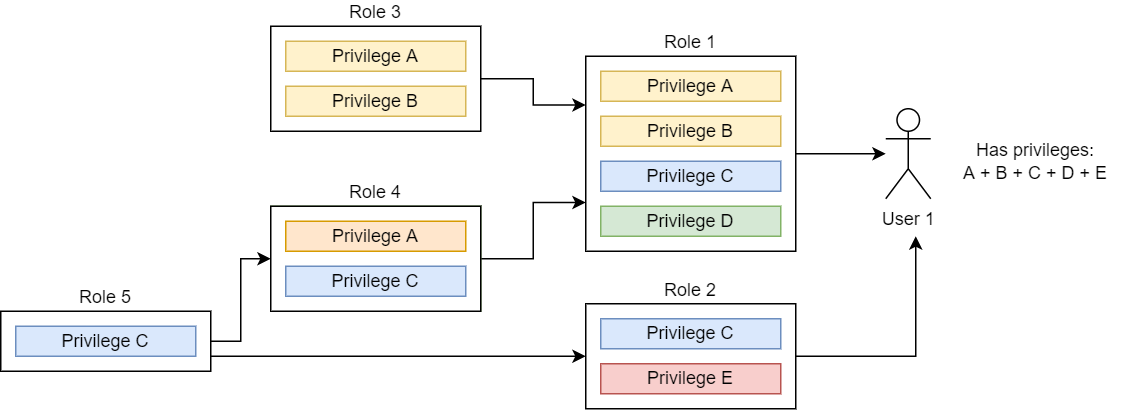
Roles are used to apply a set of privileges to a group of database users. You can grant multiple roles to the same user. You can also create a hierarchical structure of privileges by assigning roles to roles.
Row and column level security
Exasol provides both row-level security (RLS) and column-level security (CLS) through virtual schemas.
For more information, see Row and Column Level Security with Virtual Schemas in the Exasol Knowledge Base and the Row Level Security (Lua) repository on GitHub.
Password policies
When using password authentication, the required complexity of the password is determined by the the system-wide PASSWORD_SECURITY_POLICY entry in the system table EXA_PARAMETERS. The PASSWORD_EXPIRY_POLICY in this table defines when a user password expires and how much time there is to change the passwords. You can also set policies individually for specific users with ALTER USER.
The policies are deactivated by default and must be enabled through system parameters or user-specific settings.
Regularly rotate access credentials used by machine users.
For more details, see Database users and roles and Privileges.
Network security
An Exasol cluster is normally configured with two networks using separate physical interfaces on the nodes: a private network for internal communication between the nodes in the cluster, and a public network that allows connections to the database from outside of the cluster.
The physical networks must be configured using network management tools on the Linux hosts. You can then specify the private and public IP addresses for the nodes in the Exasol deployment configuration. By design, you cannot manage the network infrastructure directly from Exasol.
Firewall settings
To operate an Exasol database, traffic must be allowed through the firewall for the services in the following table.
The ports in this table are the default ports when installing Exasol. Most ports can be reconfigured.
| Protocol | Default port | Description |
|---|---|---|
| TCP | 2580 |
Default BucketFS service |
| TCP | 4444 | HTTPS access to Administration API |
| TCP | 8443 | HTTPS access to Exasol Admin server |
| TCP | 8563 | SQL client connections to the database |
| TCP | 20002 | SSH access to all cluster nodes |
| TCP/UDP | 53 | DNS |
| TCP/UDP | 123 | NTP |
| TCP/UDP | 389 | LDAP (optional) |
For a full list of the default ingoing and outgoing ports used by Exasol, see Firewall and port settings.
Network security in Exasol SaaS
In Exasol SaaS, you must create an access rule for each IP address or CIDR block that should be authorized to connect to the databases in your account. IP addresses that are not included in the allow list will not be able to connect to your databases.
To learn more, see Network security (SaaS).
OS security hardening
We recommend using OpenSCAP to security harden the operating system used in Exasol deployments. The OpenSCAP project provides an open-source toolkit for parsing and evaluating components of the Security Content Automation Protocol standard (SCAP).
You can use the NIST-certified command line scanner oscap to scan an Exasol host system using a predefined compliance profile and generate a report, and then apply the suggested remediations.
For more details, see the OS security hardening guide.
Data security and encryption
Different data encryption algorithms can be used to secure data when it is transferred through the network (data in motion) and when it is stored on the file systems and devices used by the database (data at rest).
TLS encryption (data in motion)
Transport Layer Security (TLS) is a cryptographic protocol that uses digital certificate chains to enable secure communication between client and server. Exasol uses TLS encryption by default for JDBC, ODBC, ADO.NET, CLI, and WebSockets.
To learn how to use TLS certificates with your Exasol deployment, see Upload TLS certificate.
File encryption (data at rest)
We recommend that you always use encryption in file systems used by the Exasol database, including for database backups.
You can choose any encryption method supported by the operating system and storage devices. Exasol does not provide tools for file encryption.
Tokenization
Tokenization is the process of substituting sensitive data with non-sensitive data in the form of tokens. Exasol provides integration with Protegrity, allowing you to use tokens and mask data in your Exasol database through user defined functions (UDFs) and the Protegrity Application Protector REST API.
To learn more, see Protegrity integration.
Security in the cloud
Security in Exasol SaaS
Exasol SaaS users log in to the web console using an organization account and a user account, authenticating with a username and password. Only authenticated users are allowed access to the web console.
An authenticated user can access only the databases to which they are explicitly granted access. Exasol SaaS uses role based access control and personal access tokens to manage authorization and access on the system and database layers. Additional privileges on a database can then be granted granularly using SQL.
Access to the databases in an account from database clients and other tools is controlled by the account owner through an allow list, which specifies which networks are allowed to connect.
For more details, see Access management (SaaS).
Security in native cloud deployments on AWS
Native cloud deployment of Exasol on AWS has been deprecated. To keep your Exasol database secure, we recommend that you migrate to an as-application deployment.
For more information, contact Support.
Audit logging
Auditing
The auditing mechanism in Exasol allows you to view detailed information about all sessions such as driver, client, host, and operating system user, as well as information about all executed SQL statements, including CPU usage, network usage, and disk read/write operations.
Auditing for sessions and SQL command execution is enabled by default in Exasol when you create a database. The auditing information is stored in system tables in the database, and does not require any transaction log or database schema modification.
To learn more about auditing in Exasol, see Auditing.
Monitoring
Monitoring your system is crucial for maintaining data security. Exasol does not include an internal syslog service – messages generated by the components in Exasol are instead forwarded to the host syslog service. You can use a third-party syslog management/monitoring tool to subscribe to the relevant syslog messages.
For more details about the log messages in Exasol, see Monitoring.
To learn how to set up logging with a syslog tool, refer to the documentation for the respective tool.
Integrations
Security when integrating other tools with Exasol
When adding third-party integrations to an Exasol system, make sure that the tool does not unintentionally weaken data security by removing or bypassing existing security measures in Exasol. Follow these best practices to keep your database safe:
-
Keep Exasol updated. Check the release notes regularly and apply the latest security patches for your installed Exasol version without delay.
-
Keep the tool updated to the latest supported version. Make sure that you monitor the respective vendor’s information about security updates.
Security when Exasol is integrated into other tools
If Exasol is to be integrated into another tool, observe the security guidelines for that tool/environment as well as the security guidelines and best practices for Exasol described in this article.
Compliance
For information about compliance and to access certificates and other compliance documentation, see Security & Compliance on the main Exasol website.
