Architecture overview
Learn about the architecture of an Exasol database.
An Exasol database runs in a cluster of one or more nodes. Each node is a virtual or physical host that has its own CPUs and main memory (RAM) and one or more network interfaces. The total number of CPUs and the total amount of RAM in a cluster determines the compute power.
Each node contains the Exasol database engine, the cluster operating system (COS), the storage engine (EXAStorage), a BucketFS file service for storing files such as drivers and scripts, and software for system administration.
The nodes can be hardware in your own infrastructure or virtual machines in a cloud environment, and are connected to each other over a private network. You can set up a public network to allow access to the nodes from clients outside of the cluster.
Exasol cluster operating system (COS)
COS is the software layer that manages and monitors the nodes in an Exasol cluster. COS manages communication between the nodes over the private (internal) network, and between the database and clients connected over the public (external) network.
To learn more about how you can interact with COS using internal and external tools through different APIs, see System administration.
BucketFS
BucketFS is a synchronous file system on all database nodes in an Exasol cluster that is used for storing files such as drivers and scripts. Each node in the cluster can connect to the BucketFS service and will then see the same content as the other nodes. Data stored in BucketFS is replicated locally on each node and automatically synchronized over the private network.
All configured data disks in Exasol have a preinstalled BucketFS service with a default bucket. You can create additional BucketFS services and buckets as needed.
The data in BucketFS is not included in the database backups and must be backed up separately.
To learn more about BucketFS, see BucketFS.
Database layer
Exasol Analytics Engine is a massively parallel processing (MPP) database designed on a shared-nothing architecture (SN). This means that data is distributed across all nodes in the cluster and constantly synchronized between the nodes. All nodes operate on an equal basis, there is no master node. This processing paradigm is also known as SPMD (single program multiple data).
When a client sends a query to the database, the query is first accepted by the node that the client is connected to and then distributed to all nodes in the cluster over the private network. Algorithms optimize the query, determine the best plan of action, and generate indexes as needed. The database processes the partial results based on the local data sets, and then deliver the global results back to the client.
Storage layer
Data is stored in data volumes that can be located on local or remote storage services. Database backups are stored on backup volumes, which can also be located either in the cluster or on remote storage.
Data storage is managed by a distributed storage engine, EXAStorage, which runs on all nodes. EXAStorage also manages the failover mechanisms that protect your data.
To learn how to create and manage storage volumes, see Storage management.
Failover mechanisms
An Exasol cluster can have any number of reserve nodes on standby in addition to the active data nodes. A reserve node has the same basic configuration as a data node, but it is not active and contains no data.
If storage volumes are set up with redundancy >1, an active node holds a mirror of the data on the neighboring node. If one of the active nodes fails, a reserve node will take over the role of the failed node. Data is then copied to this node from a mirror on one of the other active nodes.
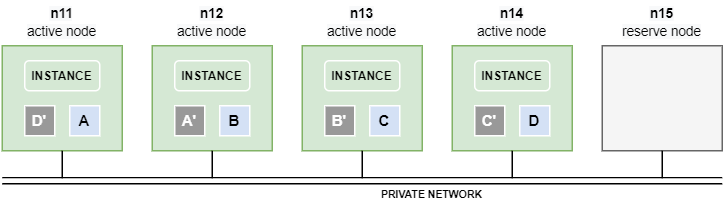
To learn more about the failover mechanisms in Exasol, see Fail safety.
Network layer
An Exasol cluster is normally configured with two networks using separate physical interfaces on the nodes: a private network for internal communication between the nodes in the cluster, and a public network that allows connections to the database from outside of the cluster.
The physical networks must be configured using network management tools on the Linux hosts. You can then specify the private and public IP addresses for the nodes in the Exasol deployment configuration. By design, you cannot manage the network infrastructure directly from Exasol.
Private network
The nodes in a cluster communicate over the private network. The private network is used to boot and configure nodes, to constantly exchange vitality and configuration information, and to synchronize the database payload.
The nodes must be assigned consecutive and evenly spaced static IPv4 addresses in the same subnet. DHCP can be used if each node always receives the same IP address.
Each private network must be fully separated from other networks. No traffic must pass in or out, and only the dedicated interfaces of the cluster nodes must be wired to this network. A cluster must never exchange traffic with private networks of other clusters.
The nodes must be directly connected to the layer 2 network (VLAN) and traffic must not be filtered.
Public network
You can configure public IP addresses for the nodes in order to allows clients outside of the private network to connect directly to the database and to the administration interfaces without being routed through the private network. A public network is not required for installation.
-
To learn more about network requirements, see Network management.
-
To learn about how to configure networks for Exasol, see Install and deploy Exasol.
System administration
Exasol provides several built-in tools and APIs that enable you to deploy and manage your databases and clusters. The system administration interfaces and tools are available on every node in a cluster.
ConfD is a low-level API that is used to perform all system administrative actions in Exasol. ConfD is available on all nodes in a deployment. You can interact with ConfD directly using the command-line tool confd_client, or indirectly through XML-RPC in your own Python programs.
Exasol Admin is an easy-to-use web interface that allows you to carry out common administration tasks such as monitoring your database, generating and analyzing logs, creating backup schedules, updating Exasol, and managing files in BucketFS.
Exasol Deployment Tool (c4) is a multi-purpose command line tool that is used to create, configure, and manage Exasol deployments on all supported platforms. You can also use c4 to access other administration interfaces in Exasol.
Exasol supports encrypted key-based and basic authentication for system administration access.
For more details about the administration interfaces in Exasol, see Administration interfaces.
