SDDC: Disaster scenarios
Learn about disaster recovery scenarios in an SDDC setup with Exasol.
Introduction
Learn about disaster recovery (DR) scenarios where multiple nodes fail or a whole database goes down. The first example describes how to test the functionality of the SDDC setup by deliberately shutting down the active database.
Example cluster setup
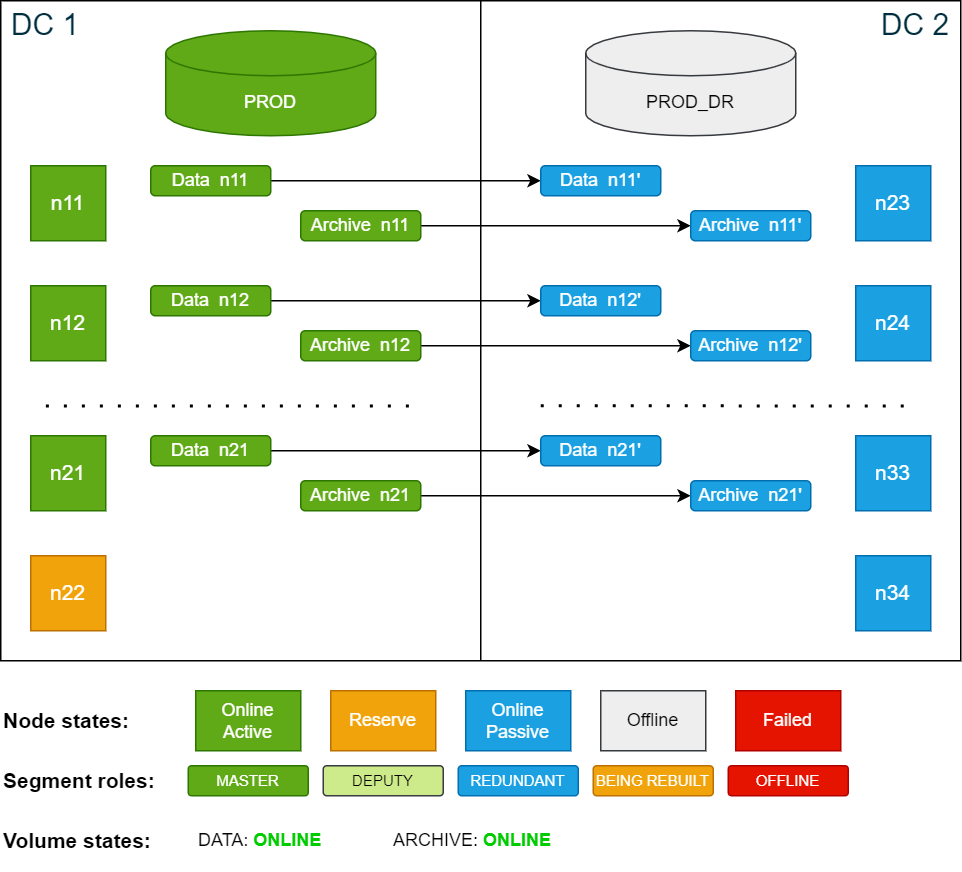
All the scenarios in this documentation are based on the example cluster configuration in SDDC: Installation. The following diagram shows the example cluster in its normal operation mode:
For simplicity, the diagrams in the examples show only 4 nodes in each data center.
Test scenario
During this test, the cluster is still capable of handling node failures and site failures since storage is unaffected and all volumes are in the ONLINE state.
In this test scenario, the active database PROD in DC 1 is intentionally shut down and the passive database PROD_DR in DC 2 is started. The storage master segments remain on the active site DC 1.
Procedure
-
Stop the active database PROD using the ConfD job db_stop:
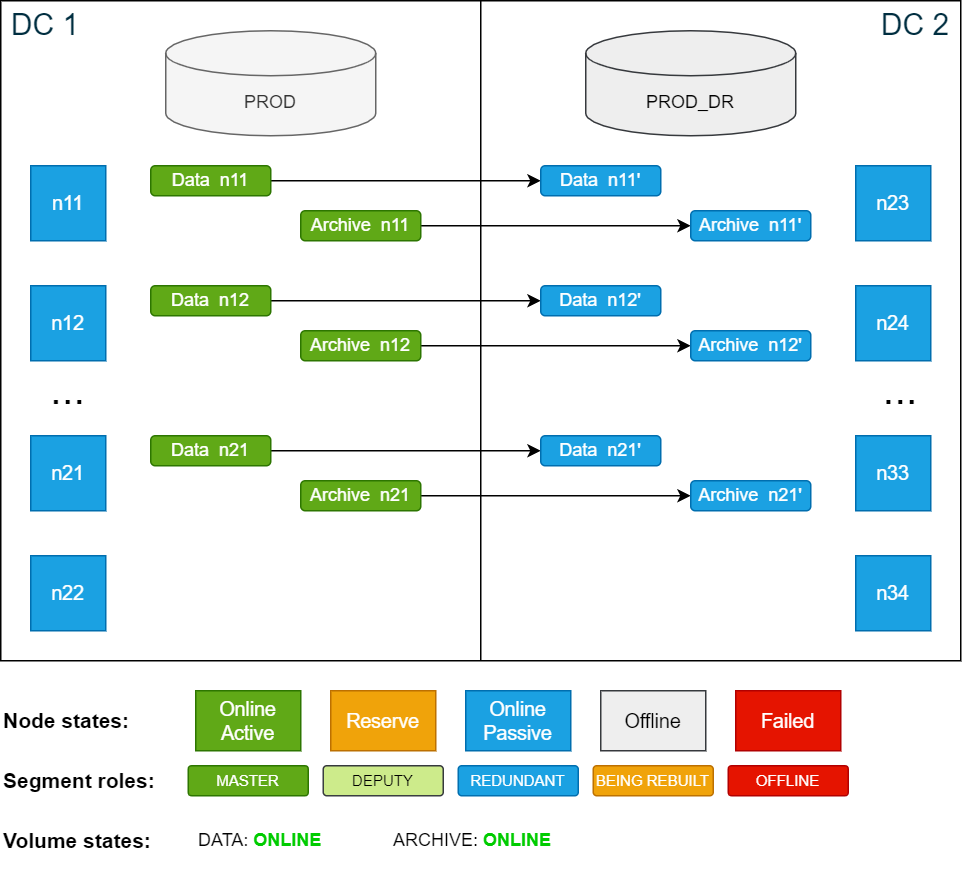
Copyconfd_client db_stop db_name: PRODOnce the database is shut down, there are no active database nodes anymore. However, the storage remains online.
Cluster state after shutting down the active database PROD:
-
Start the passive database PROD_DR using the ConfD job db_start:
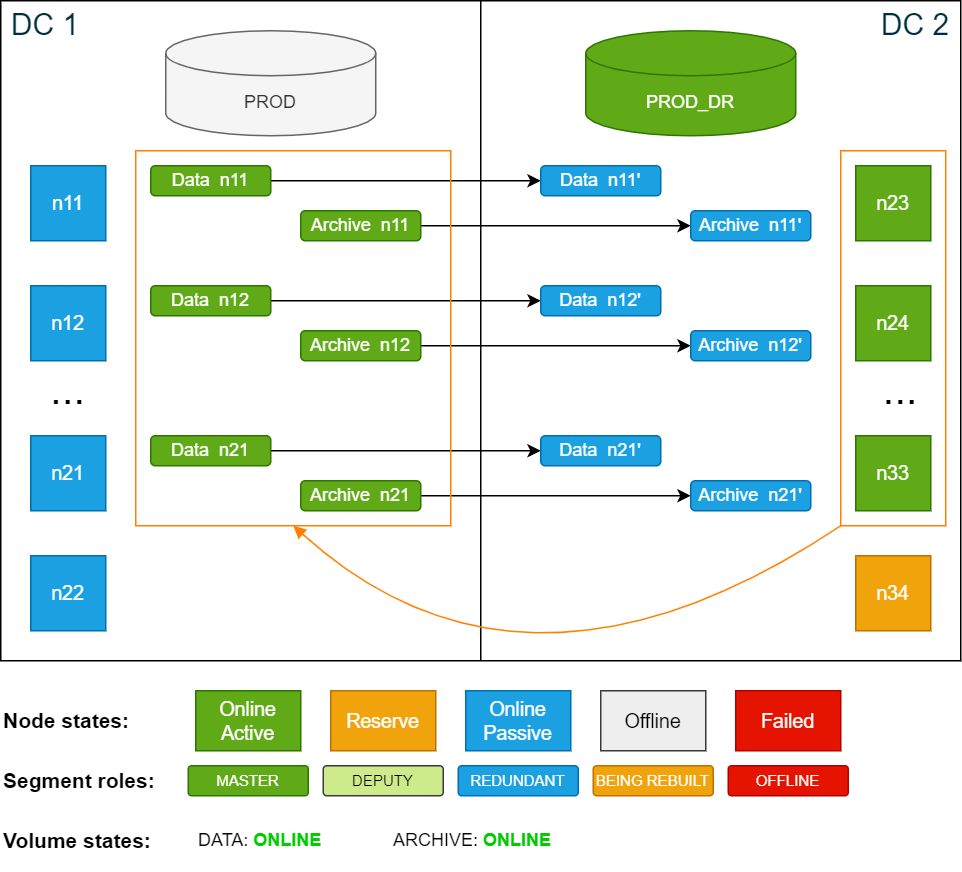
Copyconfd_client db_start db_name: PROD_DRThe PROD_DR database runs on the now active nodes in DC 2. The storage master segments remain unchanged on DC 1. As a result, nodes n23–n33 are using the master segments stored on n11–n21, which in turn are redundantly written back to n23–n33.
Cluster state after starting the passive database PROD_DR:
-
Activate the backup schedules for PROD_DR and deactivate the backup schedules for PROD (optional)
For more details, see Activate and deactivate backup schedules.
Deactivating the backup schedules for PROD is optional but recommended. If you deactivate the schedules, remember to activate them when normal operation is restored.
-
Perform a level 0 backup as described in Create backups.
If this test runs for more than one day, make sure that there is enough disk capacity in the archive volume to support an additional level 0 backup.
To revert back to normal operation, stop the PROD_DR database and start the PROD database again, then deactivate the backup schedules for PROD_DR and activate the backup schedules for PROD (if they were deactivated).
The next level 1 backup will run using the previously created level 0 backup (from the weekend). After the level 1 backup is done, consider deleting the level 0 backup from the passive database in DC 2 to free up space.
Disaster of active site (DC 1)
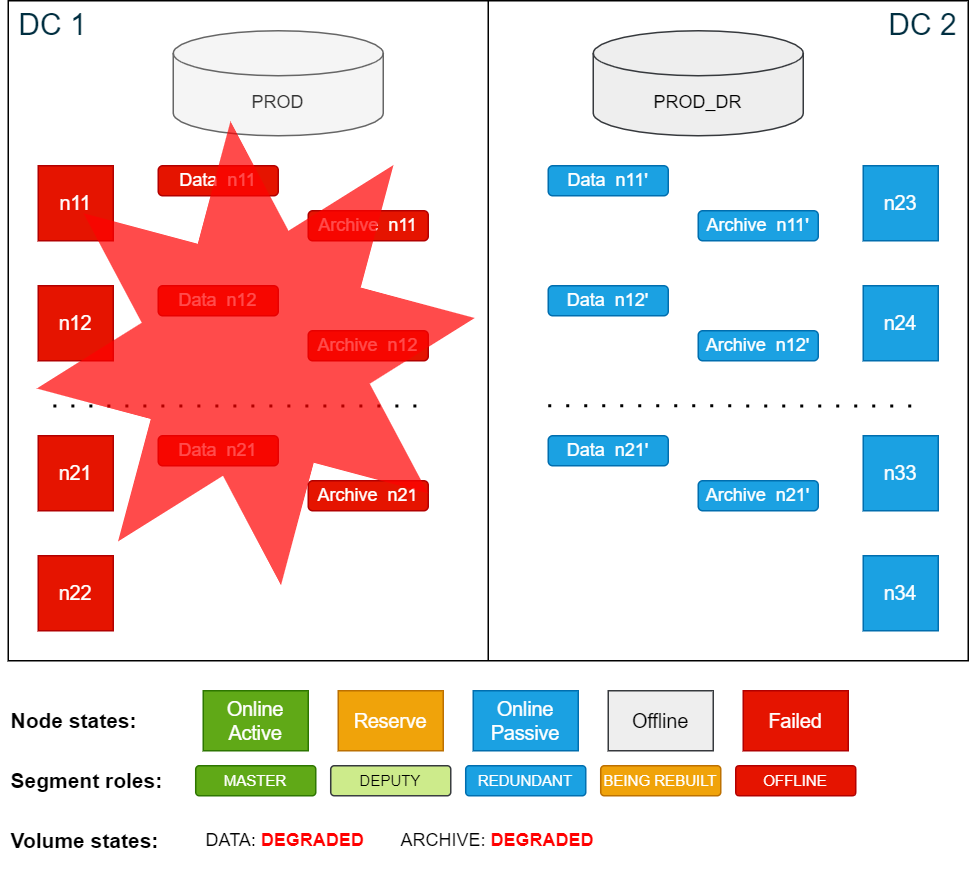
In this scenario, all nodes on the active site in DC 1 become unavailable. As a result, the active database PROD crashes due to multiple active node failures. Because all data that was last successfully committed in the active database is also written redundantly on the passive side, the only data loss would be any data that was not yet committed or was being committed when the database crashed.
Cluster overview after DC 1 (active site) has failed:
To operate an Exasol cluster, the cluster must have a quorum. To create a quorum, at least 50% + 1 of the nodes of a cluster must be online. If the cluster does not have quorum, it will not accept any changes to any of the services in the cluster. ConfD will also not show the right data and may not respond as expected.
In this scenario all nodes in DC 1 failed, which means that the cluster no longer has a quorum. In order to restore the quorum with the nodes in DC 2, the failed nodes must be suspended (temporarily removed from the cluster quorum).
The cluster requires manual intervention from this step onwards. While the most common disaster case is that one data center is unavailable (or multiple active nodes have failed), it may also be that the link between the two data centers is severed, so that each site of the cluster thinks the other has failed (split-brain state). For this reason, a process, a runbook, or a team must decide which set of nodes to mark as suspended and/or which steps to execute next.
The following actions are critical. Ensure that you are only suspending 50% of the nodes, and that you only suspend the nodes from one data center. Performing this action on both sides would lead to an inconsistent state and potential data corruption. Exercise extreme caution.
Note that it may take up to 60 seconds for the cluster to reevaluate the quorum and to recognize failed nodes. Reelections are constantly ongoing every couple of seconds.
Procedure
-
Suspend the failed nodes in DC 1 using the ConfD job node_suspend:
Copyconfd_client node_suspend nid: '[11, 12, 13, 14, 15, 16, 17, 18, 19, 20, 21, 22]'With the nodes being suspended, the quorum is reached again and ConfD jobs will behave normally. In this state, all volumes are DEGRADED, however functional. The database on the passive site in DC 2 can now be started.
-
Start the PROD_DR database using the ConfD job db_start:
Copyconfd_client db_start db_name: PROD_DRCluster state after the nodes in DC1 have been suspended:
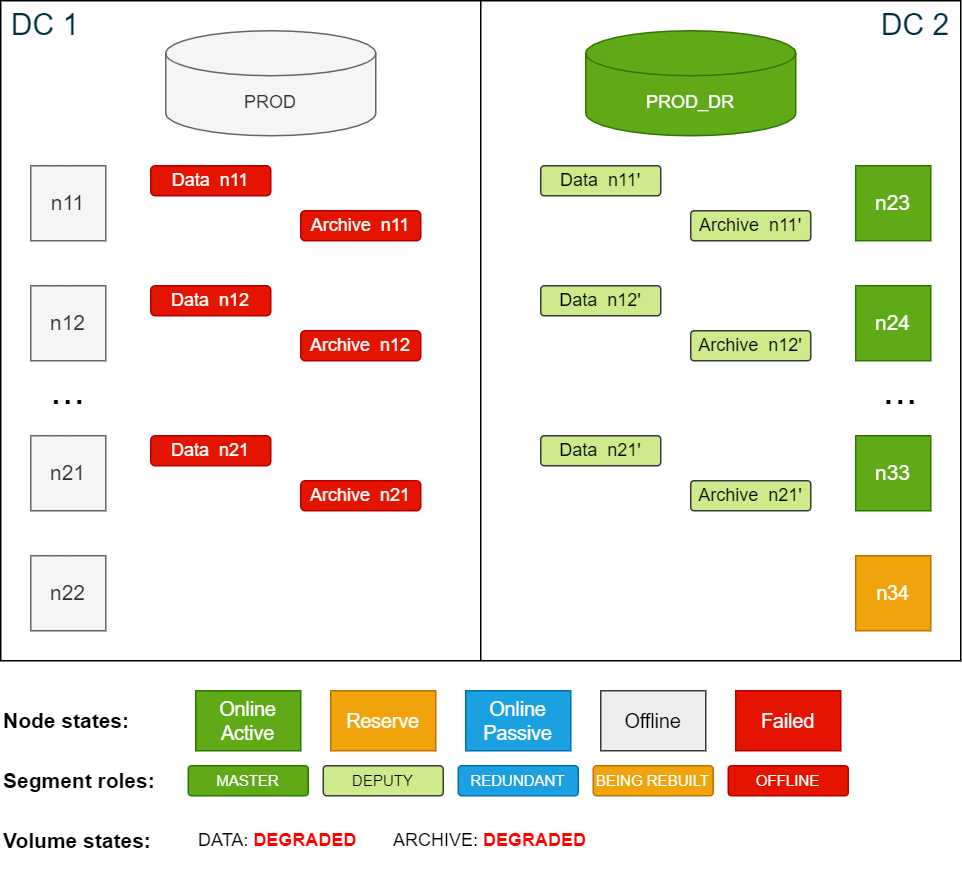
The database in DC 2 is now up and running. The original redundant segments have been promoted to
deputy
status and are running as the master segment until the failed former active nodes rejoin the cluster.Since there is now no storage redundancy, all volumes with redundancy are now in DEGRADED state.
-
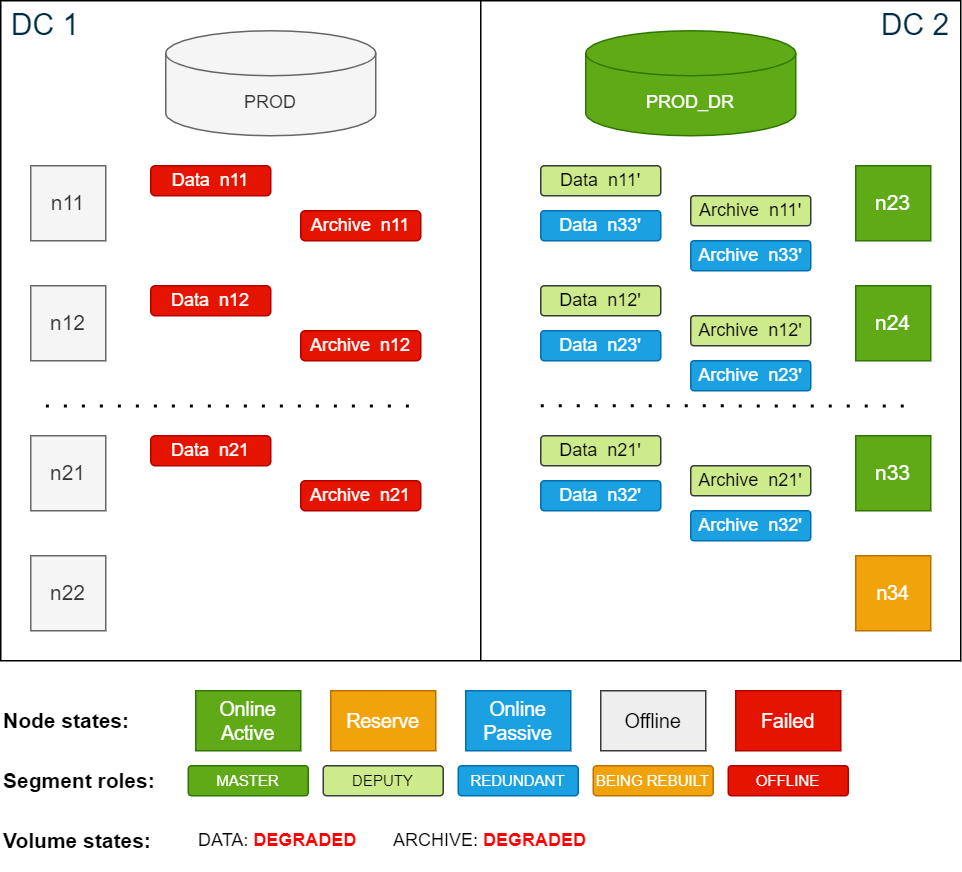
To be protected against further node failures in DC 2, you can temporarily increase the redundancy from 2 to 3 for both the data volume and the archive volume. This will create additional redundancy segments on all nodes in DC 2.
To increase the redundancy for the volumes, use the ConfD job st_volume_increase_redundancy
Copyconfd_client st_volume_increase_redundancy vname: data_vol delta: 1
...
confd_client st_volume_increase_redundancy vname: arc_vol delta: 1You can monitor the progress using
logd_collectorcsrec:Copylogd_collect StorageCopycsrec -lCopycsrec -s –v VOLUME_IDCluster state while building additional redundancy in DC2 (redundancy 3):
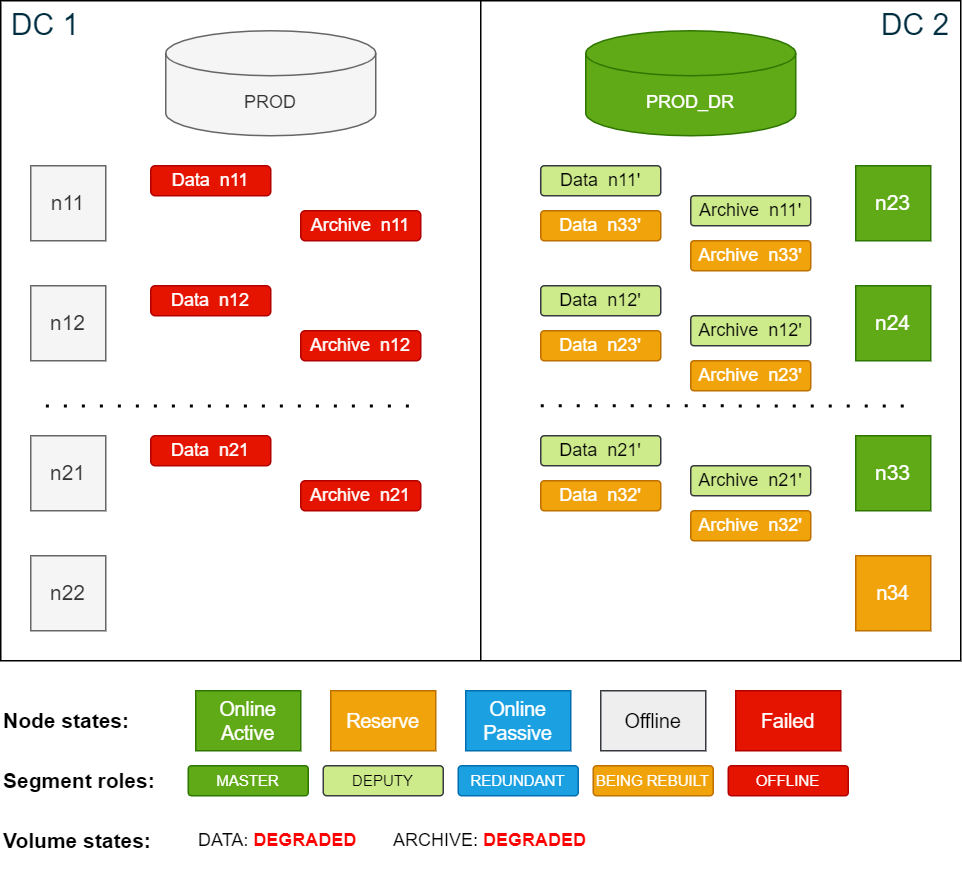
Cluster state after building redundancy 3:
-
Once the redundancy is rebuilt, perform a new level 0 backup to serve as the basis for other scheduled level 1 backups.
For more details, see Activate and deactivate backup schedules and Create backups.
In this state, the database is again protected against single node failures. The procedures to handle a node failure at this point are the same as described in SDDC: Active node failure scenarios.
Return to normal operation
The following procedure assumes that the original nodes from DC 1 rejoin the cluster. If new nodes join, you must install Exasol software on the new nodes and configure them like the original nodes.
-
Start the Exasol services on the nodes that were suspended. This will automatically resume the nodes from suspended status.
As soon as the nodes from DC 1 are resumed and online, all storage deputy segments in DC 2 will be demoted to redundancy copies and synchronizing all storage segments in DC 1 is automatically started.
How long the restoring operation takes depends on the amount of data that is outdated. In the worst case all the data will have to be restored, which can be very time-consuming.
Cluster state while segments are being restored after re-adding nodes in DC 1:
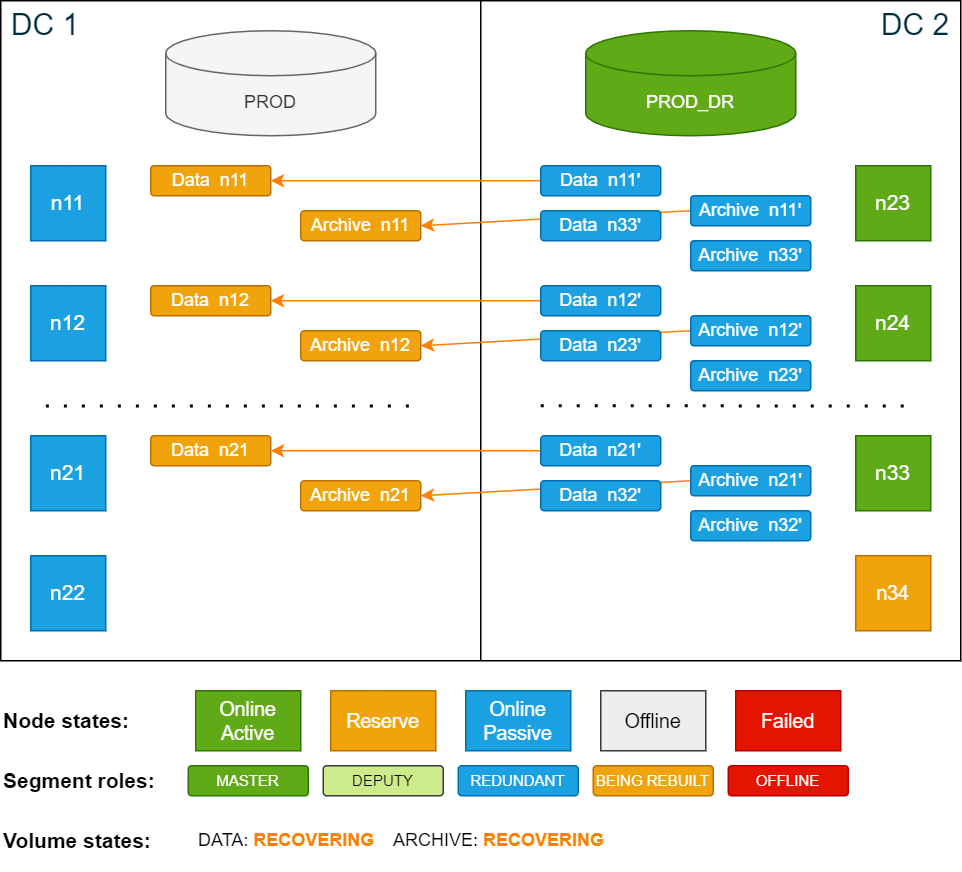
-
Once the volumes are fully restored and in ONLINE state, reduce the redundancy in DC 2 from 3 to 2 to keep disk IO at a minimum.
To change the redundancy, use the ConfD job st_volume_decrease_redundancy:
Copyconfd_client st_volume_decrease_redundancy vname: data_vol delta: 1 nid: 23
...
confd_client st_volume_decrease_redundancy vname: arc_vol delta: 1 nid: 23Cluster state after restoring master segments and removing redundancy 3:
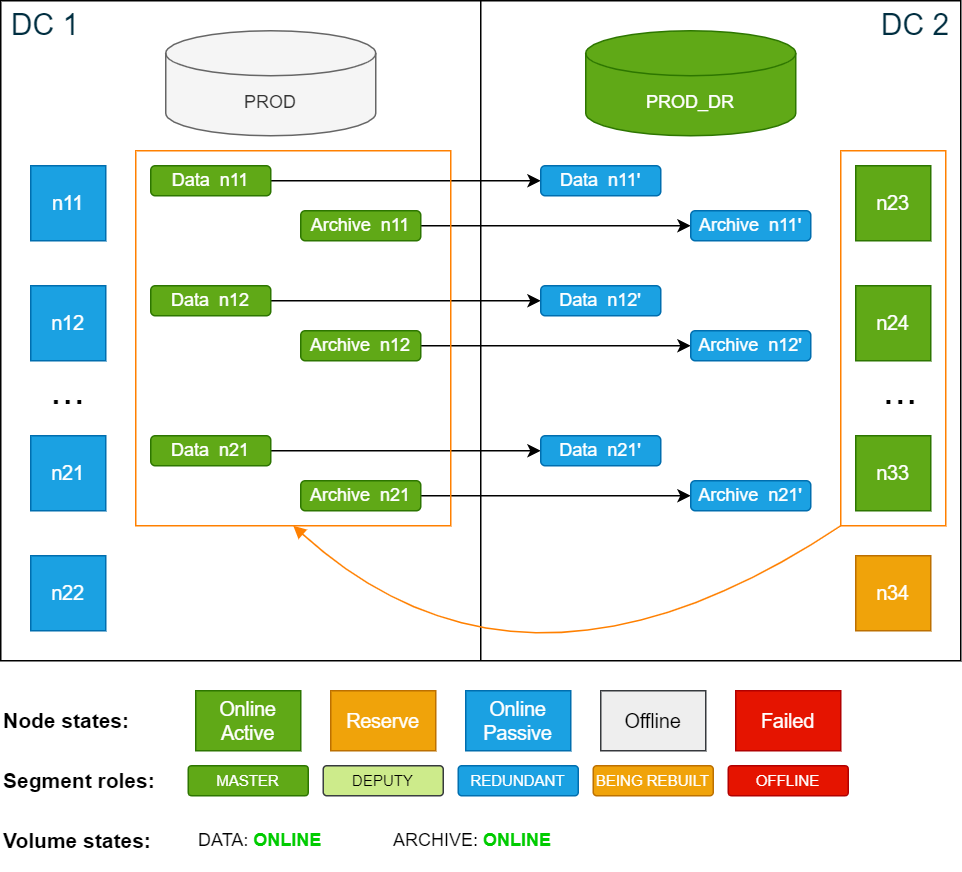
-
Stop the PROD_DR database in DC 2 using the ConfD job db_stop:
Copyconfd_client db_stop db_name: PROD_DR -
Start the PROD database in DC1 using the ConfD job db_start:
Copyconfd_client db_start db_name: PROD -
When PROD is up and running, immediately perform a level 0 backup to ensure that future level 1 backups of PROD have the correct base. For more details, see Create backups.
-
Activate the backup schedules for PROD and deactivate the backup schedules for PROD_DR. For more details, see Activate and deactivate backup schedules.
Disaster of passive site (DC 2)
In this scenario all nodes in the passive site DC 2 fail. The cluster has now lost its quorum, which means that several ConfD jobs will not function as expected. The database may still report as connectible, but users are not able to actually connect or run any commits because the storage service is not functioning properly due to the missing quorum.
Because all data that was last successfully committed is written to disk, the only data loss would be any data that was not yet committed or was being committed when the database crashed.
Cluster state after DC2 fails:
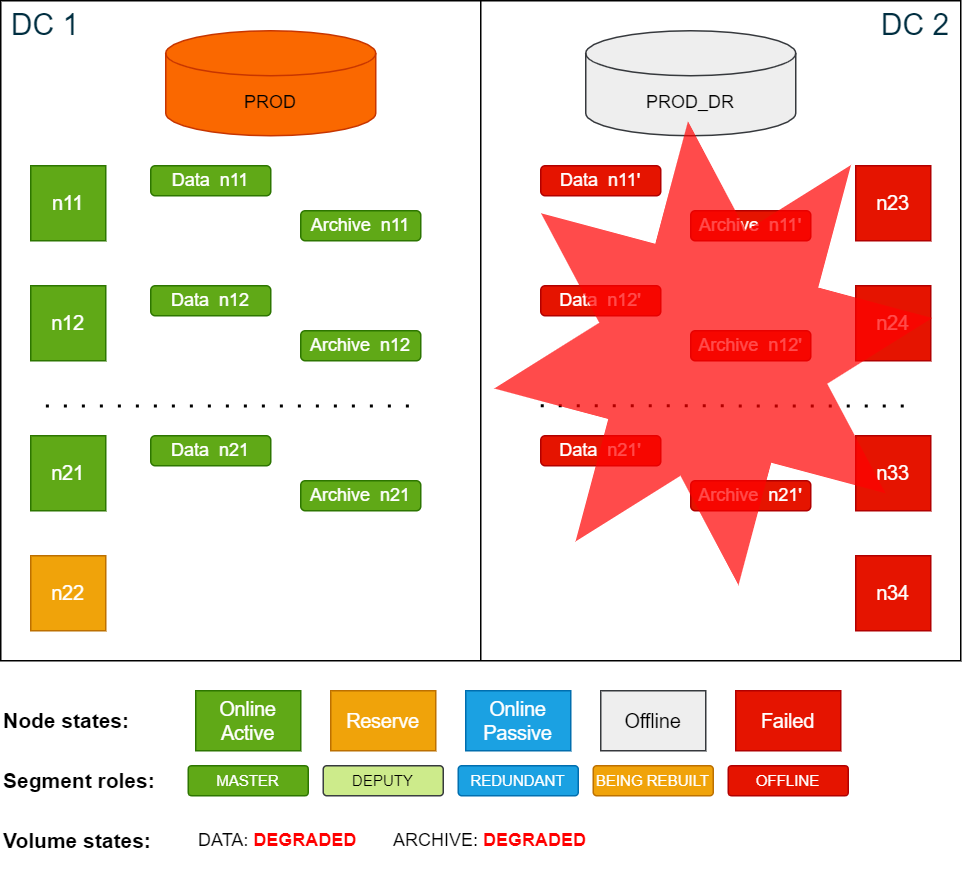
To operate an Exasol cluster, the cluster must have a quorum. To create a quorum, at least 50% + 1 of the nodes of a cluster must be online. If the cluster does not have quorum, it will not accept any changes to any of the services in the cluster. ConfD will also not show the right data and may not respond as expected.
In this scenario all nodes in DC 2 failed, which means that the cluster no longer has a quorum. In order to restore the quorum with the nodes in DC 1, the failed nodes must be suspended (temporarily removed from the cluster quorum).
The cluster requires manual intervention from this step onwards. While the most common disaster case is that one data center is unavailable (or multiple active nodes have failed), it may also be that the link between the two data centers is severed, so that each site of the cluster thinks the other has failed (split-brain state). For this reason, a process, a runbook, or a team must decide which set of nodes to mark as suspended and/or which steps to execute next.
The following actions are critical. Ensure that you are only suspending 50% of the nodes, and that you only suspend the nodes from one data center. Performing this action on both sides would lead to an inconsistent state and potential data corruption. Exercise extreme caution.
Note that it may take up to 60 seconds for the cluster to reevaluate the quorum and to recognize failed nodes. Reelections are constantly ongoing every couple of seconds.
Procedure
-
Suspend the failed nodes in DC 2 using the ConfD job node_suspend:
Copyconfd_client node_suspend nid: '[23, 24, 25, 26, 27, 28, 29, 30, 31, 32, 33, 34]'When the nodes have been suspended, the quorum is reached again and ConfD jobs will behave normally. All volumes are now in DEGRADED state, since at least one master or redundancy segment is offline.
Cluster state after suspending nodes:
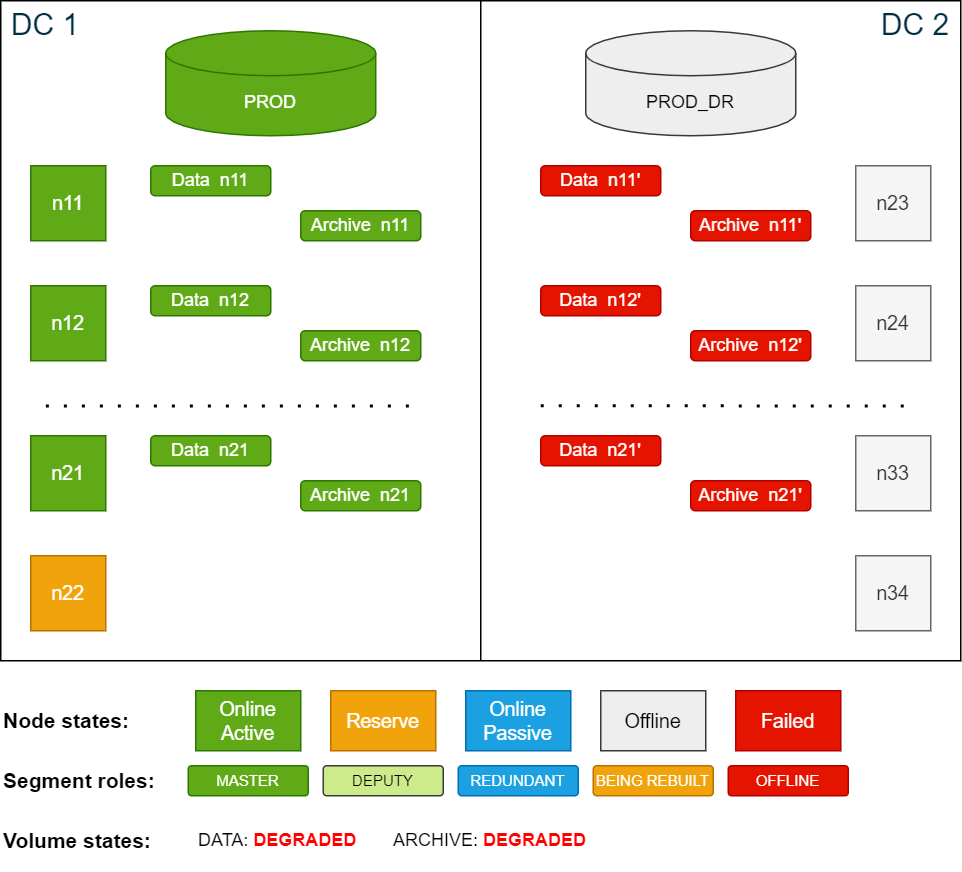
-
If the database on the active site in DC 1 is not already online, start it now using the ConfD job db_start:
Copyconfd_client db_start db_name: PROD -
Use the ConfD job db_info to view info about the database and check for messages indicating that the redundancy is missing. For example:
Copyconfd_client db_info db_name: PROD | grep info
info: "11 segments of the database volume are not online (missing redundancy)"The message
11 segments of the database volume are not online (missing redundancy)
means that there are no redundant copies of any of the data segments. -
To be protected against further node failures in DC 1, temporarily increase the redundancy for both the data volume and the archive volume locally from 2 to 3 using the ConfD job st_volume_increase_redundancy
Copyconfd_client st_volume_increase_redundancy vname: data_vol delta: 1
...
confd_client st_volume_increase_redundancy vname: arc_vol delta: 1This will create additional redundancy on all in-use storage nodes in DC 1.
You can monitor the progress using
logd_collectorcsrec:Copylogd_collect StorageCopycsrec -lCopycsrec -s –v VOLUME_IDOnce redundancy is increased, a manual backup is not needed because a level 1 backup will run automatically according to the previous schedule.
Cluster state after creating additional redundancy in DC2 (redundancy 3):
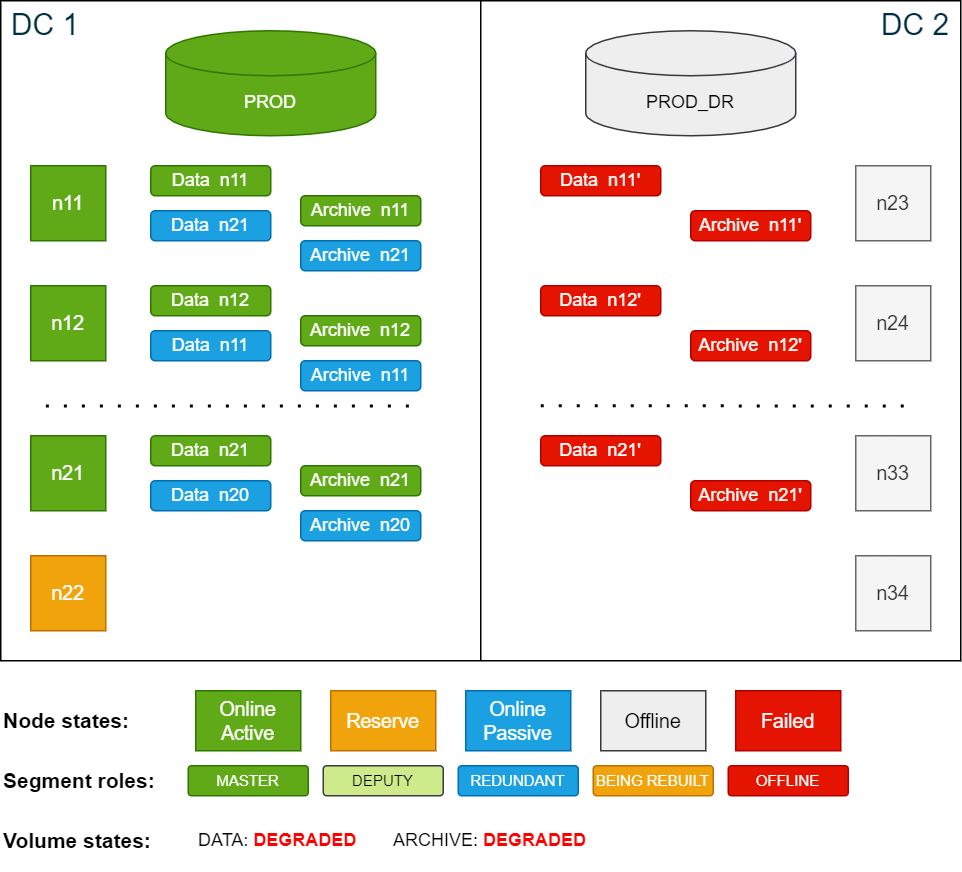
In this state the cluster is still protected against single node failures due to volume redundancy 3. The procedure to handle a node failure in this state are the same as described in SDDC: Active node failure scenarios, with the difference being that the redundant copies are in DC 1.
Return to normal operation
The following procedure assumes that the original nodes from DC 2 rejoin the cluster. If new nodes join, you must install Exasol software on the new nodes and configure them like the original nodes.
-
Start the Exasol services on the nodes that were suspended. This will automatically resume the nodes from suspended status.
As soon as the nodes have joined the quorum, the storage service will automatically start to restore the outdated data segments in DC 2.
How long the restore process takes depends on the amount of data that is outdated. In the worst case, all data will be have to be restored, which can be very time-consuming.
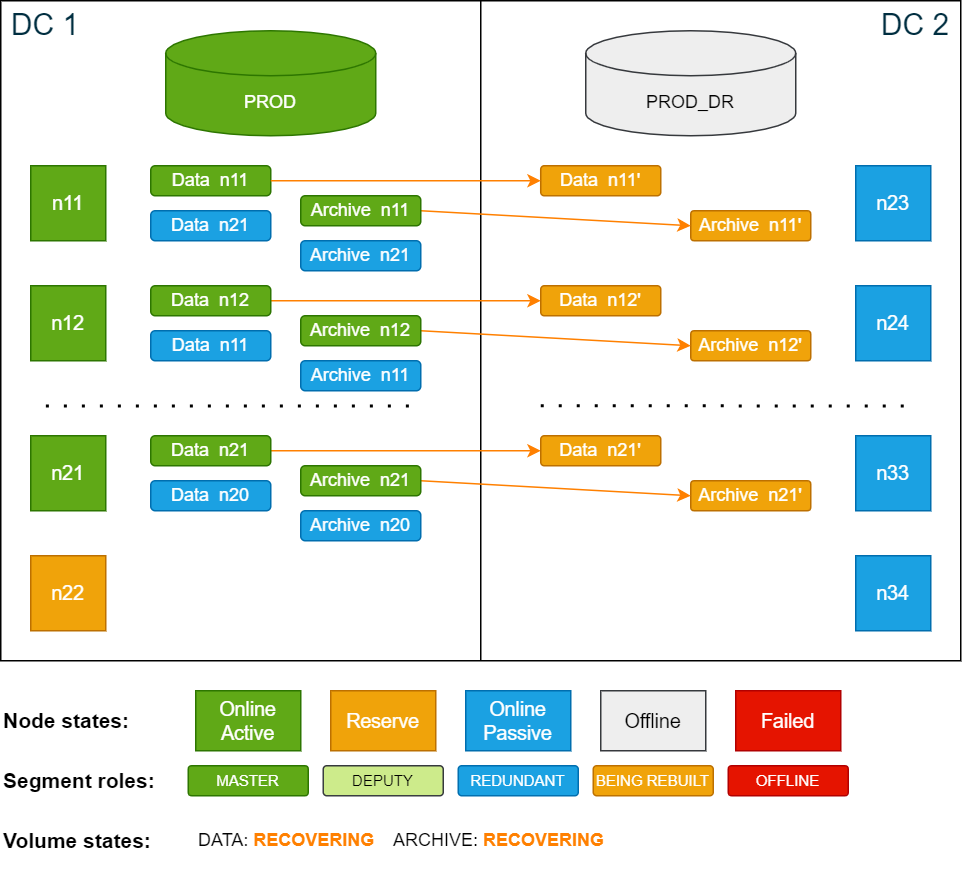
Cluster state while the nodes in DC 2 are being resynchronized:
-
Once the volumes are fully restored and in ONLINE state, reduce the redundancy in DC 1 from 3 to 2 to keep disk IO at a minimum. To change the redundancy, use the ConfD job st_volume_decrease_redundancy:
Copyconfd_client st_volume_decrease_redundancy vname: data_vol delta: 1 nid: 23
...
confd_client st_volume_decrease_redundancy vname: arc_vol delta: 1 nid: 23The cluster is now fully functional again.
Network failure between data centers (split-brain)
In most disaster scenarios, one of the data centers becomes unavailable. However, if the network between the two data centers is severed – known as a split-brain state – then manual intervention is required to determine which cluster to use. In this state, both halves of the cluster are still available but not able to connect to the other half. When this happens, the quorum for the cluster is lost. To return the cluster to an operational state, you must choose which site to leave online, and which to leave offline.
To recover from this scenario:
-
Shut down all nodes from the site that will not be used. If you are unable to connect via SSH to send a shutdown command, physically shut down the machines.
This action is needed to prevent the two sites from running with different configurations. Not doing so may lead to issues when the network connection is restored.
-
Based on which site was shut down, follow either the procedure Disaster of active site (DC 1) or Disaster of passive site (DC 2).
A loss of quorum due to a split-brain situation can also be resolved by using a small VM as a quorum node
, with the only purpose of being a tiebreaker to determine which side is active or not. For more information, contact Support.
