SDDC: Active node failure scenarios
Learn about scenarios where an active node fails in an SDDC setup with Exasol.
Introduction
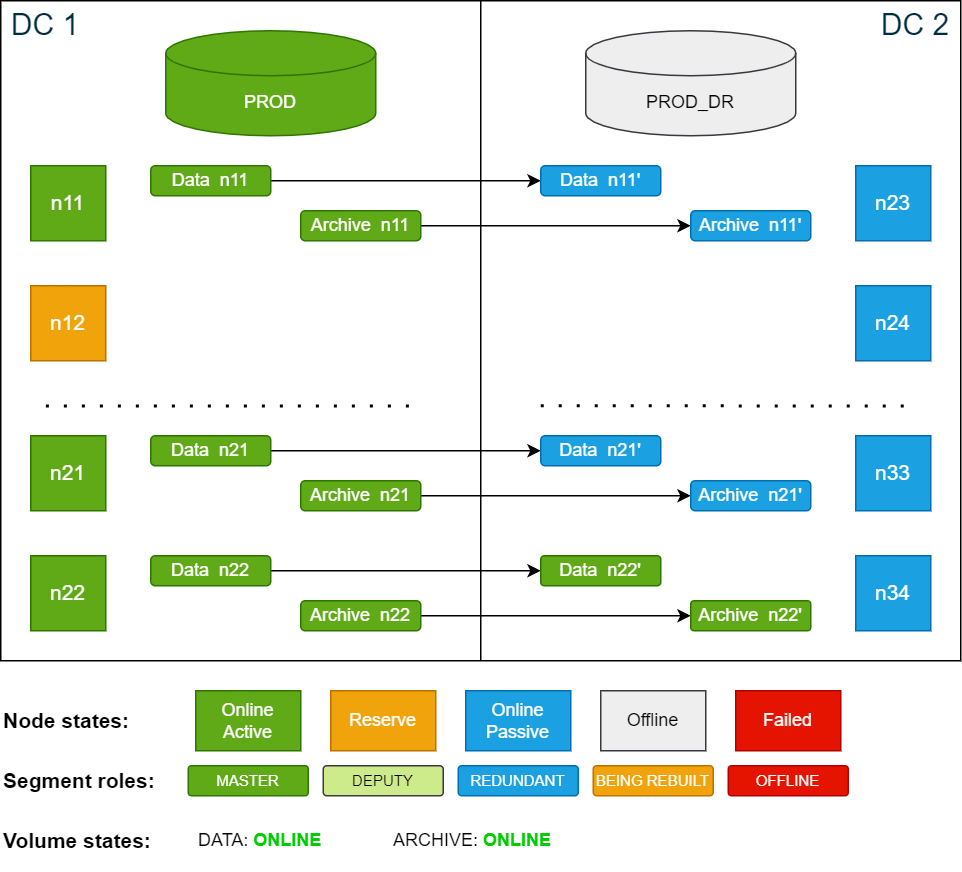
An active node is any node that is actively being used by a running database. In the following examples, nodes n11 to n21 in data center 1 (DC 1) are active nodes used by the PROD database during normal operation, while node n22 is defined as a reserve node.
If one of the active nodes in DC 1 fails, the database will automatically restart. The former reserve node n22 will now be an active node and immediately starts to operate on the corresponding redundancy segments in DC 2. This is essentially the same behavior as in a normal "hot standby" failover procedure, except that the redundancy segment is on a secondary site.
Persistent and transient failures
If the failed node is not back online within the time set in volume_move_delay (persistent failure), the storage service will begin to move data segments from the deputy node in DC 2 to the new active node in DC 1.
If the failed node rejoins the cluster before the volume_move_delay time has passed (transient failure), data segments are not moved. The delay (default: 600 seconds) prevents heavy write operations caused by moving data segments between nodes in case the node goes temporarily offline, for example, due to a brief network outage or a node reboot.
Example cluster setup
All the scenarios in this documentation are based on the example cluster configuration in SDDC: Installation. The following diagram shows the example cluster in its normal operation mode:
For simplicity, the diagrams in the examples show only 4 nodes in each data center.
Transient node failure
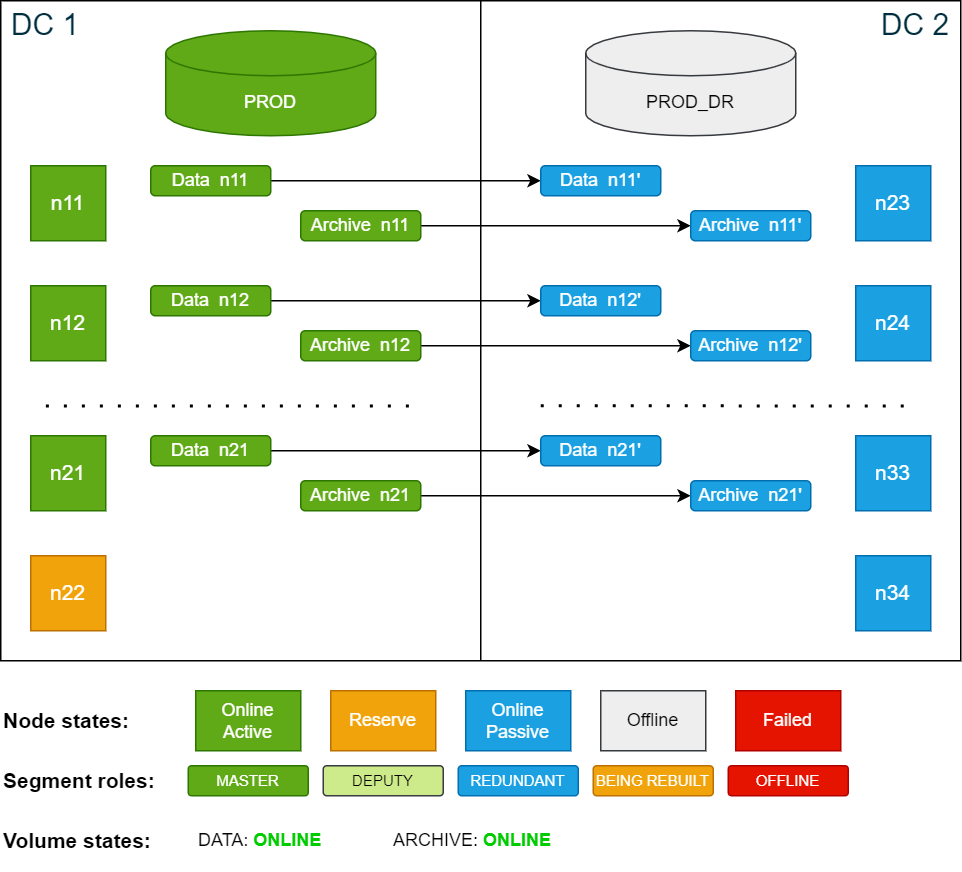
A node failure that is recovered within the time period configured in the volume_move_delay setting (default = 600 seconds) is defined as a transient node failure.
In this scenario, the active node n12 in DC 1 fails and the database automatically restarts with node n12 automatically replaced by the reserve node n22 (failover).
The data and archive volumes are now in DEGRADED state because they are missing master or redundancy copies.
Cluster state after database is restarted following an active node failure (failover):
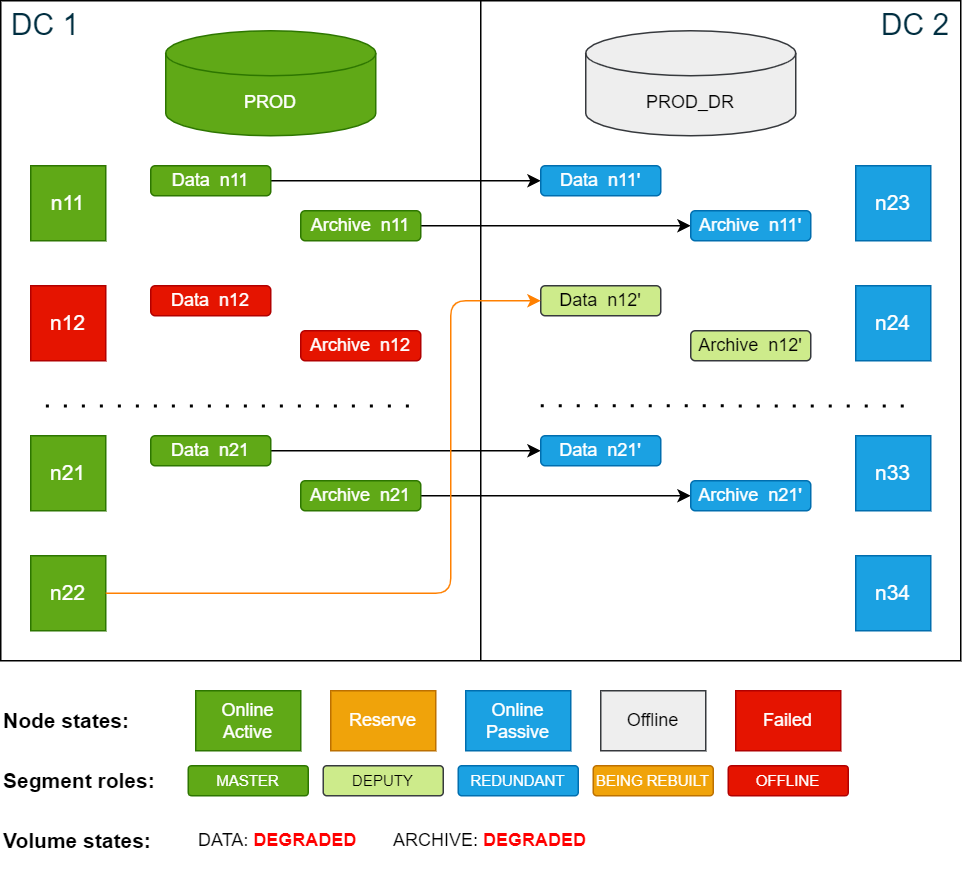
If there is an additional node failure in DC2 at this point and before the volume_move_delay time has passed, the database will go down since there are no extra redundancy copies. The data volumes will then be in LOCKED state (missing data segments).
Once the database has restarted, the now active node n22 uses the redundancy segments of the failed node on the passive site in DC2, which are temporarily promoted as deputy
segments.
When the database is up and running again after the failover, do the following:
-
Check the volume states using the ConfD job st_volume_info (use
jqto filter the output):Copyconfd_client st_volume_info vname: data_vol --json | jq -r '.state'
DEGRADED
confd_client st_volume_info vname: arc_vol --json | jq -r '.state'
DEGRADED -
Check the database state using the ConfD job db_info (grep for
info):Copyconfd_client db_info db_name: PROD | grep info
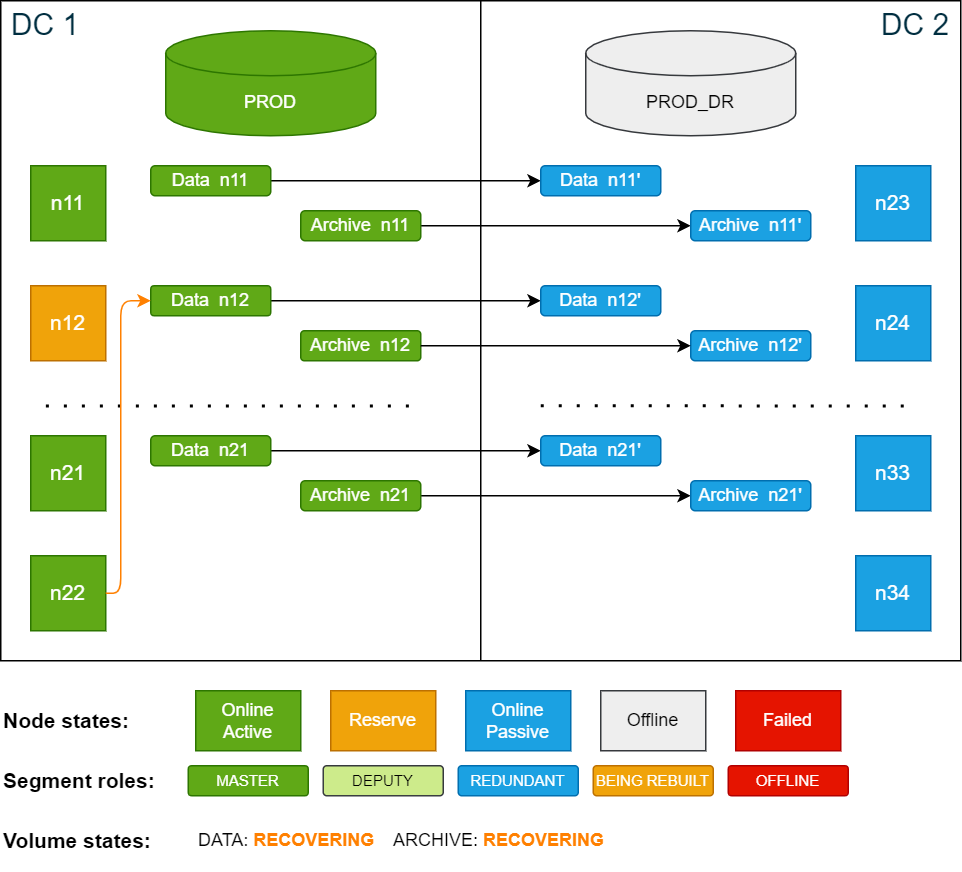
info: 'Payload of database node 22 resides on volume master node 12. 1 segments of the database volume are not online (missing redundancy)'Node n22 is now an active database node while the data is still accessed on n12, which is now a reserve node. The data segments on n12 are being synced between the two sites.
Cluster state after the failover – n22 is active database node and n12 is active storage node:
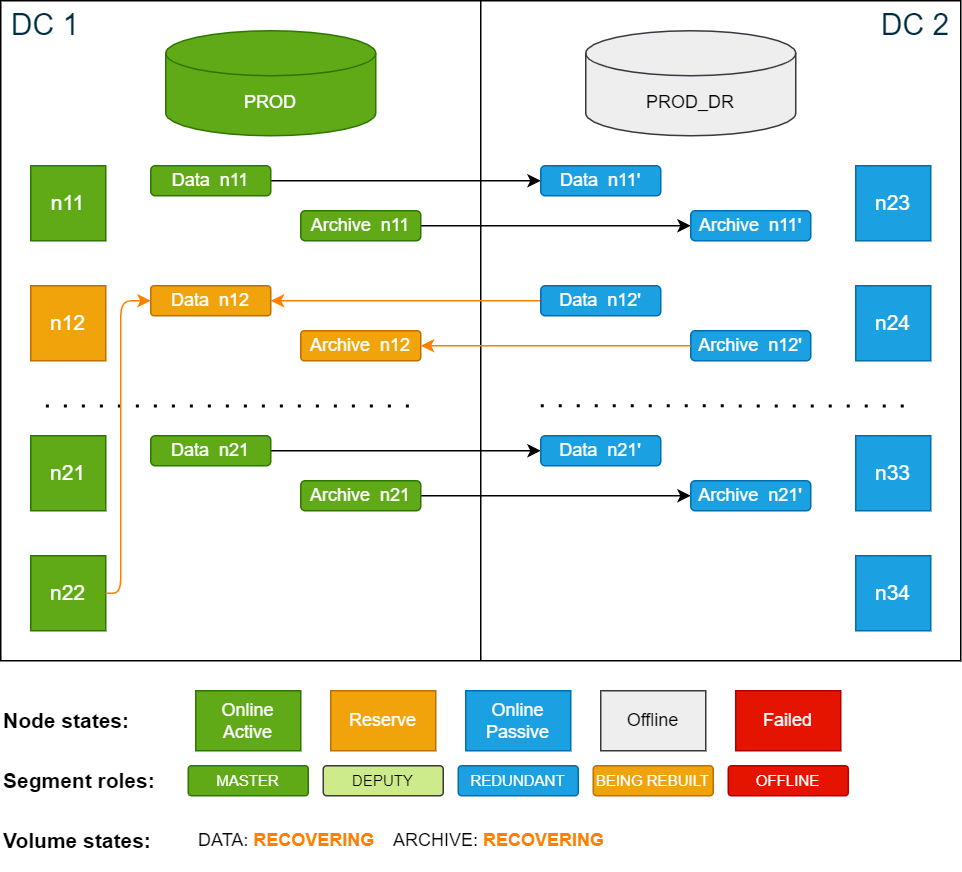
Cluster state after the restoration of n12 is done:
-
Check that storage data is accessed remotely using the ConfD command db_info (grep for
info):Copyconfd_client db_info db_name: PROD | grep info
info: 'Payload of database node 22 resides on volume master node 12.'Once all the segments on node n12 are recovered, the volume states will change from RECOVERING to ONLINE. The SDDC cluster is now fully operational and capable of handling disaster recovery scenarios again.
Restoring the cluster after a transient node failure
After a transient node failure, data segments are not accessed locally anymore because the data of the failed node was not moved to the new active node. This means that the database is now operating across both sites. This can cause latency and performance degradation in the IO layer and is not recommended for long periods of time. To restore normal operation, there are two options:
Option 1 – Restart the database with the failed node as active node
For this operation, a short downtime is required.
To restore the cluster to its original state after the failover, stop the database and start it again using n12 as an active node and n22 as the reserve node. This operation will result in a short downtime as the database is restarted.
Cluster state after it has been restored to its original state:
Option 2 – Move segments to the new active node
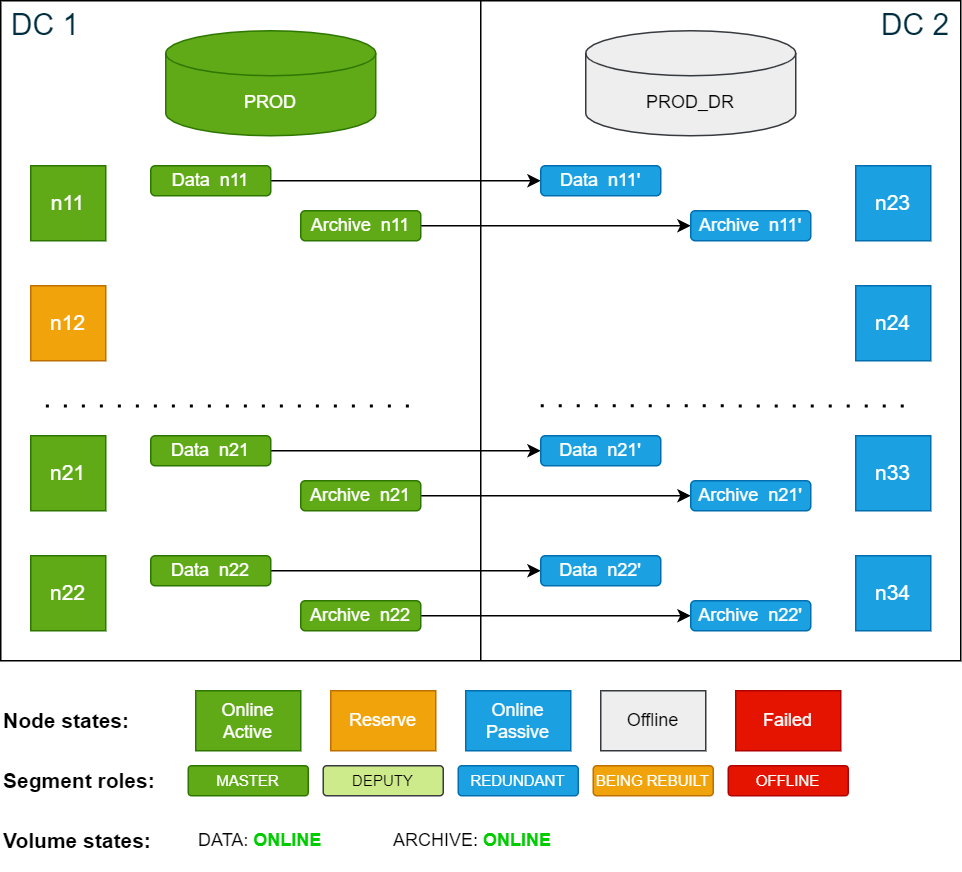
This option involves moving data segments from node n12 to node n22 after the failover. This is typically done if you need to perform maintenance on n12 after the failure. No downtime is required for this operation.
To ensure that both volumes use the same nodes you need to move the segments for both the data volume and the archive volume.
To ensure that the segments are running on the nodes that you expect, you can verify on which nodes the segments exist before moving them. To learn how to do this, see SDDC: Monitoring.
While data segments are being restored on the target node, the cluster cannot handle disaster recovery scenarios.
-
Use the ConfD job st_volume_move_node to move the data segments:
Copyconfd_client st_volume_move_node vname: data_vol src_nodes: '[12]' dst_nodes: '[22]'
...
confd_client st_volume_move_node vname: arc_vol src_nodes: '[12]' dst_nodes: '[22]' -
Move redundant segments from n24 to n34 (optional):
Copyconfd_client st_volume_move_node vname: data_vol src_nodes: '[24]' dst_nodes: '[34]'
...
confd_client st_volume_move_node vname: arc_vol src_nodes: '[24]' dst_nodes: '[34]'
Cluster state after all data has been moved from n12 (n24) to n22 (n34):
Persistent node failure
A node failure where the node does not recover within the time period configured in volume_move_delay setting (default = 600 seconds) is defined as a persistent node failure.
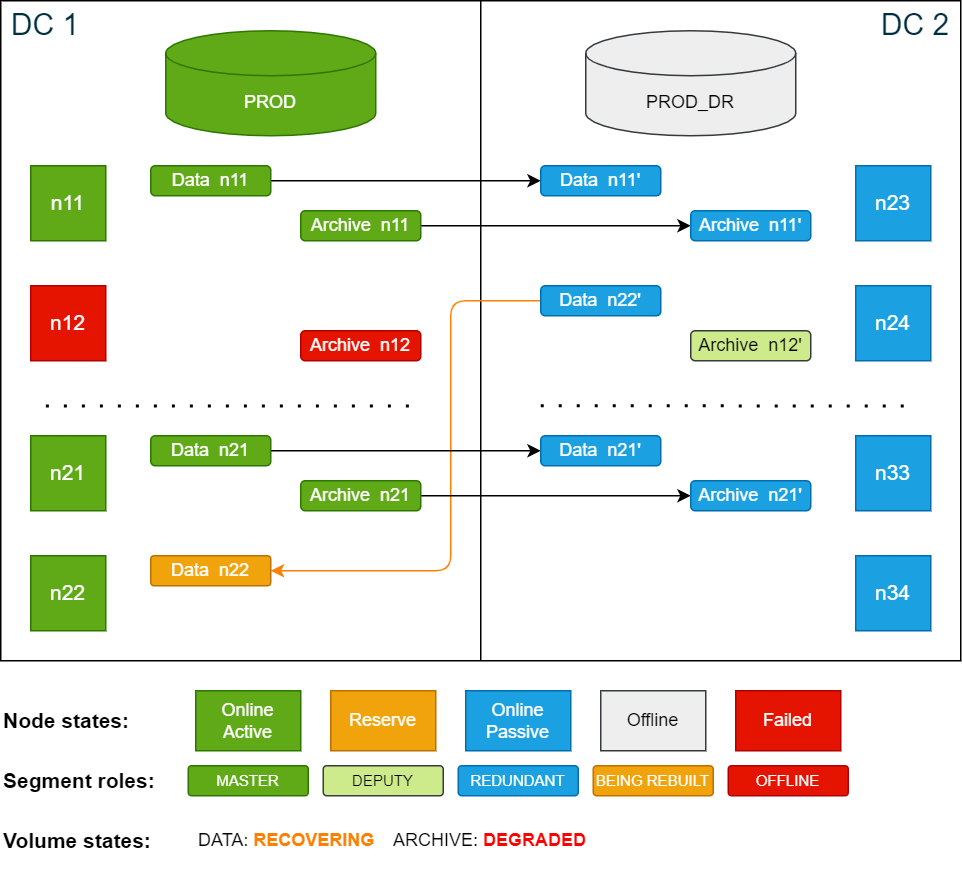
In this scenario the active node n12 in DC 1 fails and does not recover within the delay period. During the failover phase, node n12 is automatically replaced by the reserve node n22. Since the node is still offline, the data segments are automatically restored on the now active node n22 from redundant copies on node n24 in DC 2.
During the restore process the volumes are in a RECOVERING state. A volume transitions to LOCKED only if neither a master segment nor a redundancy/deputy segment is available for a node.
If the volume is configured with redundancy 2, it enters a DEGRADED state in either of the following cases:
-
The redundancy segment is offline
-
The master segment is offline while a deputy segment is available
During recovery, additional node failures are tolerated as long as each node has at least a master segment or a redundancy/deputy segment available.
Cluster state after database is restarted following an active node failure (failover):
After the database has restarted, do the following:
-
Check the volume states using the ConfD job st_volume_info (use
jqto filter the output):Copyconfd_client st_volume_info vname: data_vol --json | jq -r '.state'
DEGRADED
confd_client st_volume_info vname: arc_vol --json | jq -r '.state'
DEGRADED -
Check the database state using the ConfD job db_info (grep for
info):Copyconfd_client db_info db_name: PROD | grep info
info: 'Payload of database node 22 resides on volume master node 12. 1 segments of the database volume are not online (missing redundancy)'The former reserve node n22 is now an active node. In this case, n12 does not recover. After the volume move delay period has passed, the storage service starts to restore data segments on n22 from DC 2. While the segments are being restored, the data volume is in RECOVERING state.
The archive volume is still in DEGRADED state, because segments on archive volumes are not automatically moved to other nodes. You will move these segments manually in the next step.
Cluster state after volume move delay is passed and segment are being moved:
-
Move the segments on the archive volume to n22 using the ConfD job st_volume_move_node:
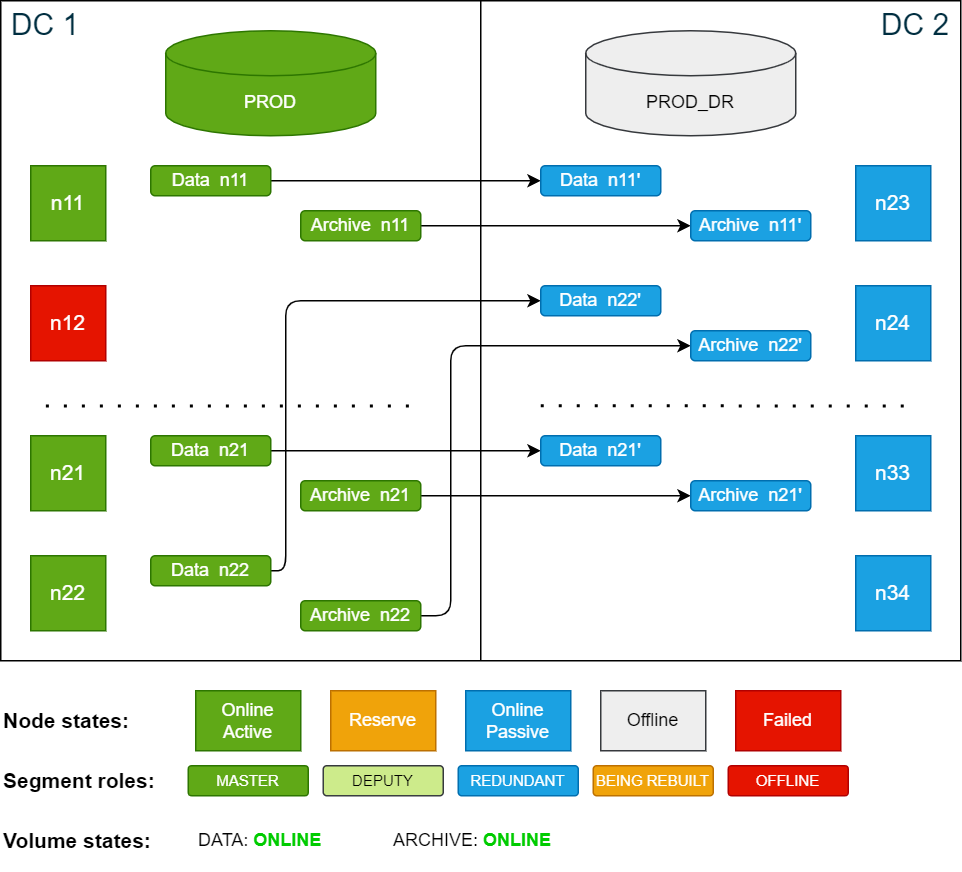
Copyconfd_client st_volume_move_node vname: arc_vol src_nodes: '[12]' dst_nodes: '[22]'Once the redundant segments have been restored, both volumes will be in ONLINE state. At this point the SDDC cluster is fully functional again and can handle disaster recovery scenarios.
Cluster state after moving segments to n22:
Optional: restore original site layout
If you wish to keep the passive site layout similar to the active site, you can move the segments stored on n24 to n34. This requires no database downtime, but while the segments are being moved the cluster cannot switch to the passive side.
To move node segments from n24 to n34, use the ConfD job st_volume_move_node:
confd_client st_volume_move_node vname: data_vol src_nodes: '[24]' dst_nodes: '[34]'
confd_client st_volume_move_node vname: arc_vol src_nodes: '[24]' dst_nodes: '[34]'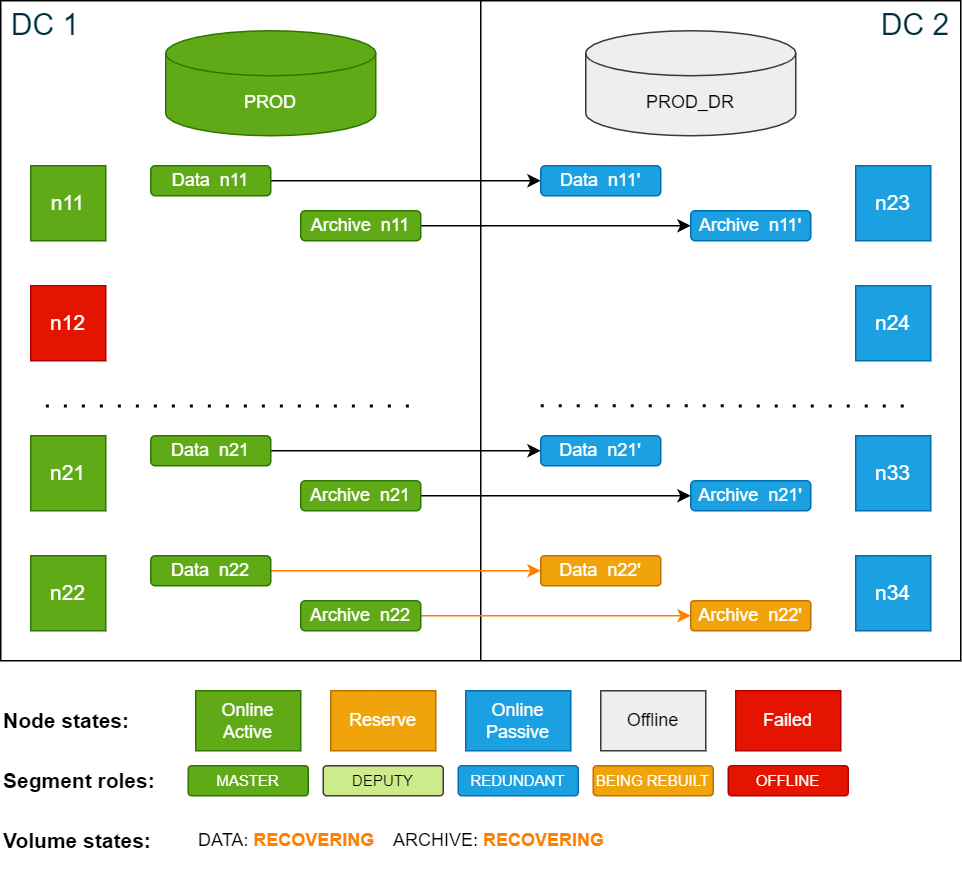
You can monitor the progress in the storage logs. Progress and ETA are updated every 5 minutes.
logd_collect StorageCluster state after the synchronization is complete:
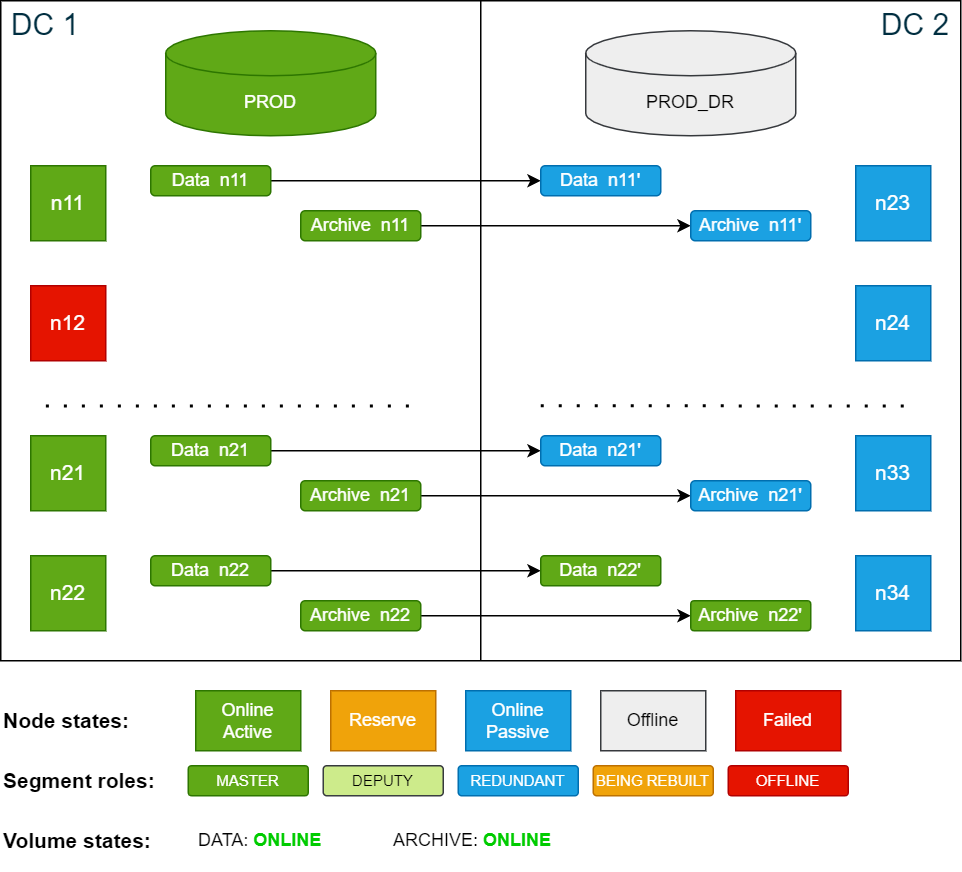
Cluster state after the failed node n12 is repaired. The node is automatically added as a reserve node: