Literals represent constants that possess a specific value as well as a corresponding data type.
Literals can be entered into tables as values or used within queries as constants, for example, in comparisons or function parameters. If the literal displays a different data type than the assigned or comparison type, the data type that is smaller is implicitly converted.
You can group literals as follows:
- Numeric literals
- Boolean literals
- Date and time literals
- Interval literals
- String literals
- NULL literals
Examples
| Literal | Description | |
|---|---|---|
123
|
Integer |
See Numeric literals |
-123.456
|
Decimal number |
|
1.23456E-32
|
Double value |
|
TRUE
|
Boolean value |
See Boolean literals |
DATE '2007-03-31'
|
Date |
See Date and time literals |
TIMESTAMP '2007-03-31 12:59:30.123'
|
Timestamp |
|
INTERVAL '13-03' YEAR TO MONTH
|
Interval (YEAR TO MONTH ) |
See Interval literals |
INTERVAL '1 12:00:30.123' DAY TO SECOND
|
Interval (DAY TO SECOND) |
|
'ABC'
|
String value |
See String literals |
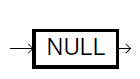
NULL
|
NULL (no value) |
See NULL literals |
Numeric literals
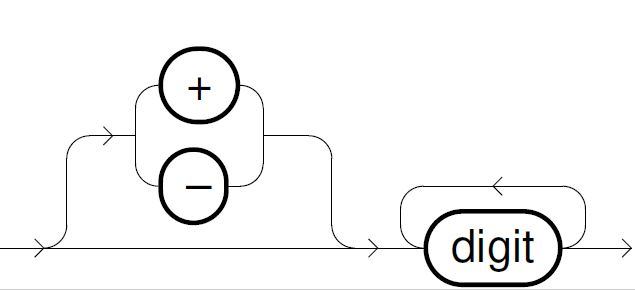
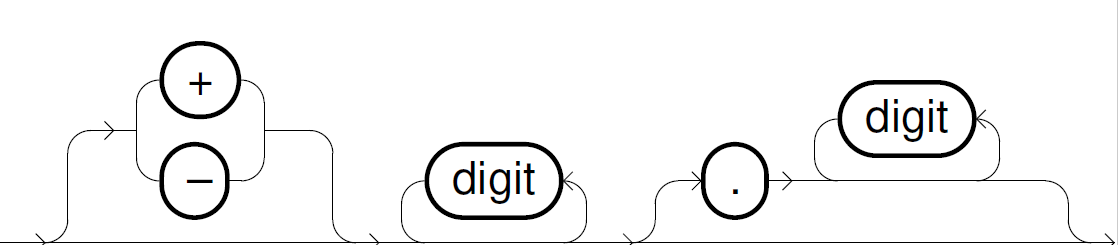
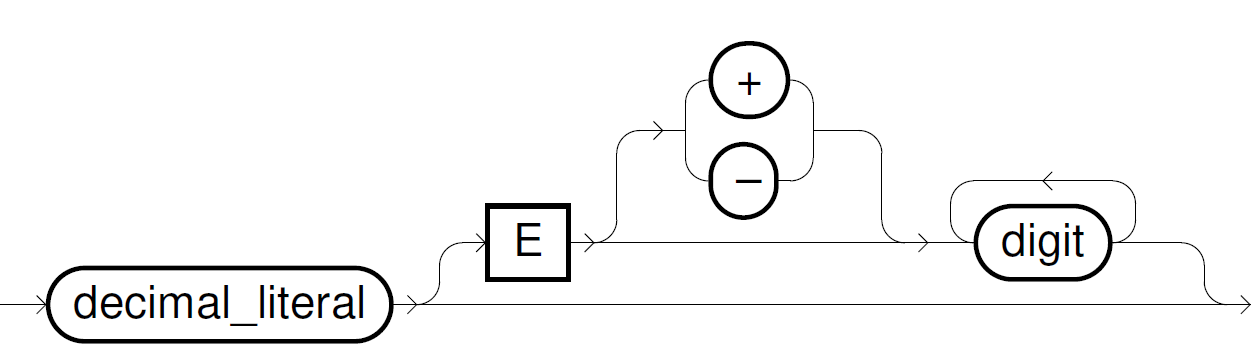
Numeric literals represent a number. If the number is represented exactly in a DECIMAL type, Exasol chooses the smallest literal type. Otherwise the type of the literal is DOUBLE.
Numeric literals can be distinguished as follows:
integer_literal::=
decimal_literal::=
double_literal::=
Boolean literals
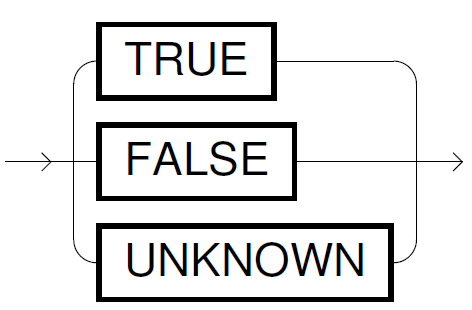
Boolean literals have only 3 valid values: TRUE, FALSE, and UNKNOWN (similar to NULL). Instead of a literal, you can also use strings (for example, 'T' or 'True' and 'F' or 'False') or integers (0 and 1).
For more details, see Boolean data type.
boolean_literal::=
Date and time literals
Date and time literals represent a particular point in time. They have a fixed format, which means that they are not as flexible as the TO_DATE or TO_TIMESTAMP conversion functions. In most cases, the conversion functions should be given priority over literals.
For more information, see Built-in functions and Date/time format models.
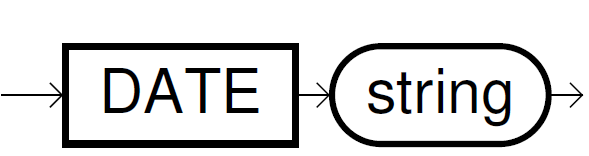
date_literal::=
timestamp_literal::=
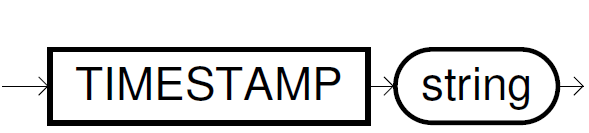
The following formats are specified for string:
| Literal | Format | Description |
|---|---|---|
DATE
|
'YYYY-MM-DD'
|
For example: |
TIMESTAMP
|
'YYYY-MM-DD HH24:MI:SS.FF9'
|
This literal has the data type Examples:
Note: In Exasol versions before 8.32.0 the maximum precision is |
Interval literals
Interval literals describe an interval of time and are very useful for datetime arithmetic.
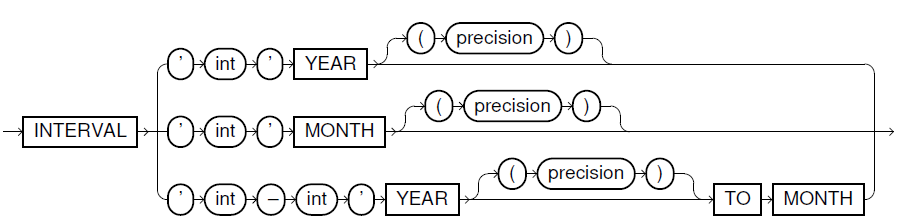
interval_year_to_month_literal::=
-
The integers
intdefine the number of years or months in the interval.For
YEAR TO MONTHthe first integer is the number of years, the second one the number of months (0 to 11). -
precisionspecifies the maximal number of digits (1 to 9). If this parameter is not set, 2 digits are allowed.
Examples
| Interval literals | Meaning |
|---|---|
INTERVAL '5' MONTH
|
5 months |
INTERVAL '130' MONTH(3)
|
130 months |
INTERVAL '27' YEAR
|
27 years |
INTERVAL '2-1' YEAR TO MONTH
|
2 years and 1 month |
INTERVAL '100-1' YEAR(3) TO MONTH
|
100 years and 1 month |
interval_day_to_second_literal::=
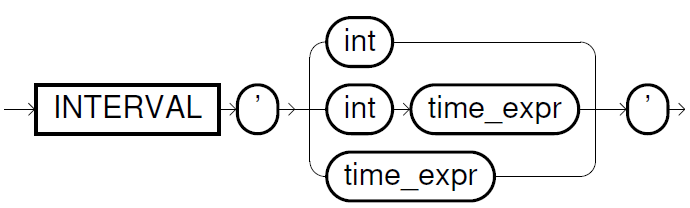
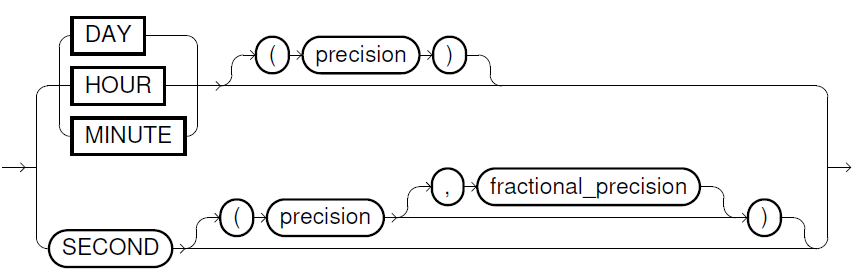
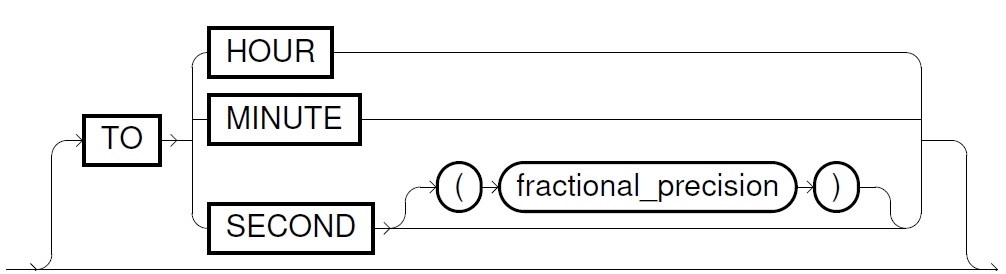
-
intdefines the number of days (seePrecisionfor maximum number of digits) -
time_exprspecifies a time value in formatHH[:MI[:SS[.n]]]orMI[:SS[.n]]orSS[.n]. Valid values are 0–23 for hours(HH), 0–59 for minutes(MI)and 0–59.999 for seconds(SS).precisiondefines the maximal number of digits for the leading field which allows you also to use larger numbers for hours, minutes and seconds (as shown in the following examples).fractional_precisiondefines at which position the fractional part of the seconds are rounded (0 to 9, default is 3).In
time_expr, you have to specify the whole used range, for example,HH:MIin case ofHOUR TO MINUTE. -
The precision of seconds is limited to 3 decimal places.
-
The optional parameter
precisionspecifies the maximum number of digits for the leading field. By default, two digits are allowed. -
The interval borders must be descending. For example,
SECOND TO MINUTEis not valid.
Example:
| Interval literals | Meaning |
|---|---|
INTERVAL '5' DAY
|
5 days |
INTERVAL '100' HOUR(3)
|
100 hours |
INTERVAL '6' MINUTE
|
6 minutes |
INTERVAL '1.99999' SECOND(2,2)
|
2.00 seconds (rounded after the second place) |
INTERVAL '10:20' HOUR TO MINUTE
|
10 hours and 20 minutes |
INTERVAL '2 23:10:59' DAY TO SECOND
|
2 days, 23 hours, 10 minutes and 59 seconds |
INTERVAL '23:10:59.123' HOUR(2) TO SECOND(3) |
23 hours, 10 minutes and 59.123 seconds |
String literals
String literals are used to represent text. String literals use the smallest character sets available. The ASCII character set will be used if only ASCII characters are included, otherwise the UTF-8 character set will be used.
To include a single quote character in a string, use two successive single quotes. For example, the string literal 'AB''C' represents the value AB'C.
string_literal::=
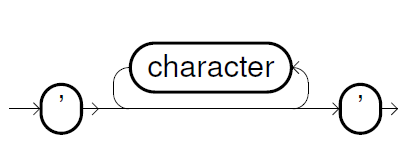
For more information, see String data types.
An empty string literal ('') is evaluated as NULL .