SDDC: Overview
This article provides an an overview and explains the main considerations when planning an SDDC solution.
Introduction
An Exasol cluster consists of multiple nodes, typically with one or more nodes marked as a reserve
node that will take over for any failed node on demand. With this configuration the data is stored redundantly on two nodes. This ensures that even in case of a hardware failure, the data is not lost since a copy of it exists on a different node. This type of setup, however, is unable to protect against a disaster scenario in which the entire data center is unavailable.
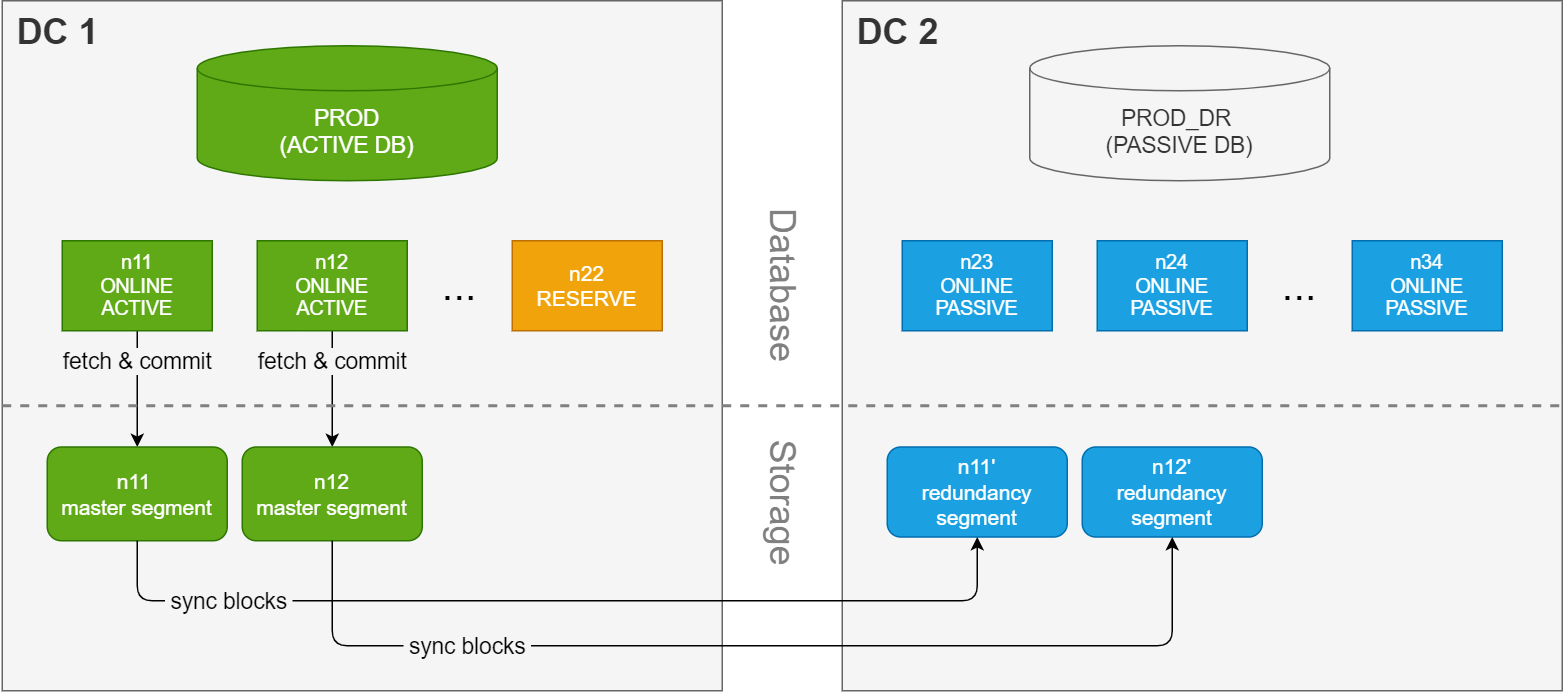
A synchronous dual data center (SDDC) solution, on the other hand, stretches
the cluster across two data centers. The cluster is split into an active
side and a passive
side, with half of the nodes in each data center. Each side contains a database with the exact same number of nodes, and both databases are using the same data volume. As a result, only one database can be running (active) at a time.
On the storage layer, redundant copies of the data segments are created and maintained on the passive side. This redundancy is a part of every commit in the database, which guarantees that the data is present on both data centers for each successful transaction. Since the synchronization happens as a part of the commit, there is no delay between the commit time and the data being synchronized to the other data center.
Simplified overview of a synchronized dual data center setup
Interconnect network bandwith
Because the communication between the data centers takes place on the storage layer, there is no risk of performance or syncing issues due to latency in the connection between the sites during normal operation. Performance will then only be limited by the network bandwidth between the nodes in the cluster. However, to avoid bottlenecks in the communication between the sites we recommend using either a dedicated network link or reserved bandwidth on a shared network, and to dimension the network bandwidth based on the peak aggregate workload, including all file transfers, backups, and failover traffic.
The connection between the two data centers requires either a dedicated network link or reserved bandwidth on a shared network to avoid bottlenecks. Performance is influenced by network latency, disk I/O, and the shared/limited bandwidth, and can also be impacted by firewalls or encryption.
Network saturation may also make cluster nodes unresponsive, threatening stability. To provide redundancy in case of a network outage, we recommend using an aggregated network.
How to calculate the minimum required bandwidth
Example:
Database commits only:
3 nodes × 4 disks per node × 200 MB/s per disk = 2,400 MB/s
If backups are running simultaneously, assuming each node backs up at 250 MB/s:
3 nodes × 250 MB/s = 750 MB/s additional base load
Total required bandwidth:
2,400 MB/s (commits) + 750 MB/s (backups) = 3,150 MB/s
Convert MB/s to Gbit/s:
3,150 MB/s / 125 MB/s (per Gbit/s) = 25.2 Gbit/s
Result:
For this example, provision at least 25 Gbit/s bandwidth to handle peak database and backup activity without bottlenecks.
Disk throughput is a theoretical maximum. Actual throughput depends on disk type (SSD, NVMe, HDD), IOPS, block size, encryption, controller features, size and frequency of database writes (small or large blocks), and the type of database queries being executed.
The example only takes peak write operations and backups into account. Be sure to include all regular and exceptional loads (application traffic, management tasks, etc.) in final network sizing.
Throughput reference table
The following table shows the approximate transfer times for transferring either 30 GB or 3 GB (numbers are randomly chosen) at maximum available throughput, not accounting for protocol or environmental overhead.
Actual transfer rates will typically be lower due to real-world factors.
|
Bandwidth |
Throughput |
Transfer time for 30 GB data |
Transfer time for 3 GB data |
|---|---|---|---|
|
1 Gbit/s |
125 MB/s |
~245.8 s (4.1 min) |
~24.6 s |
|
10 Gbit/s |
1,250 MB/s |
~24.6 s |
~2.5 s |
|
20 Gbit/s |
2,500 MB/s |
~12.3 s |
~1.2 s |
|
40 Gbit/s |
5,000 MB/s |
~6.1 s |
~0.6 s |
Recommendations
-
Match the bandwidth of the connection with the peak aggregate workload, including all file transfers, backups, and failover traffic (storage recovery).
-
Use higher bandwidth for high-performance clusters with simultaneous database writes and backups.
-
Always analyze actual production workloads and consider real-life testing to validate theoretical sizing.
