Purpose
Use this statement to grant system privileges, object privileges, roles, or connection access to users and roles.
Prerequisites
| SQL statement | Required privileges |
|---|---|
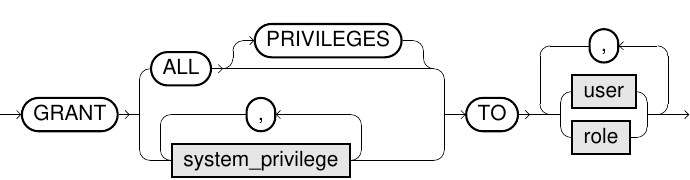
GRANT <system_privilege> TO <user>
|
System privilege |
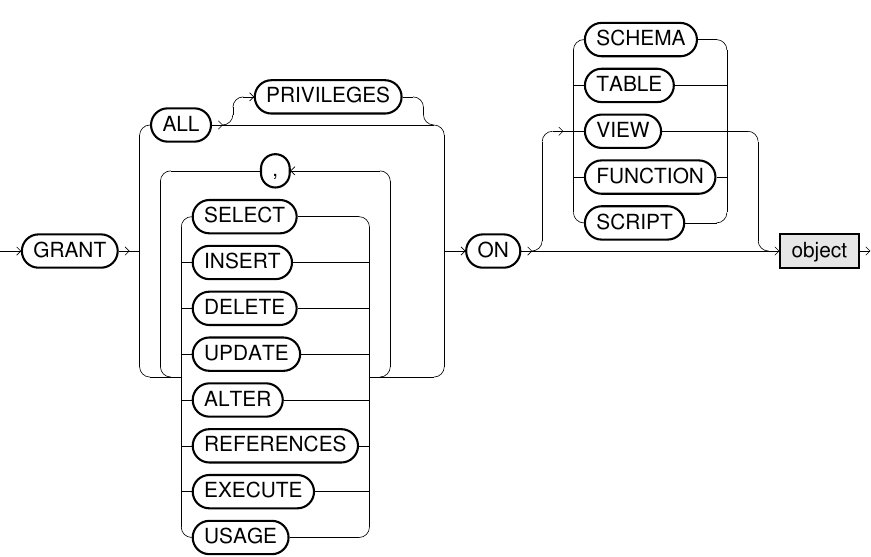
GRANT <object_privilege> ON <object> TO <user>
|
System privilege AND System privilege If |
GRANT <role> TO <user>
|
System privilege |
GRANT IMPERSONATION ON
|
The current user must have the DBA role. |
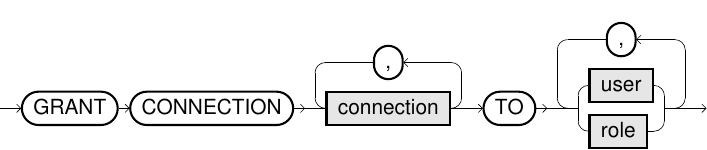
GRANT CONNECTION <connection> TO <user>
|
System privilege GRANT ANY CONNECTION, OR <connection> was granted to the current user or one of their roles with WITH ADMIN OPTION. |
GRANT ACCESS ON CONNECTION <connection> TO <user>
|
System privilege GRANT ANY CONNECTION, OR <connection> was granted to the current user or one of their roles with WITH ADMIN OPTION. |
Syntax
grant_system_privileges::=

grant_object_privileges::=
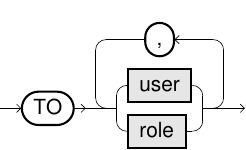
grant_roles::=

grant_impersonation::=

grant_connection::=

grant_connection_restricted::=

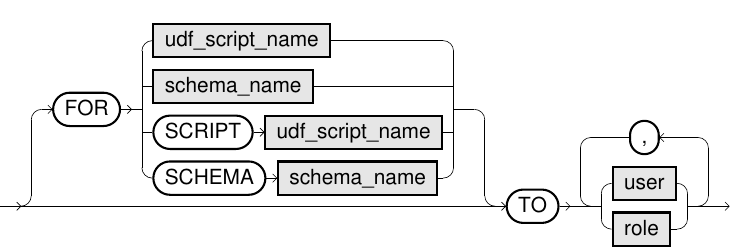
System and object privileges
Expand the following sections to see details about the effective permissions in each of the system and object privileges.
 System privileges
Users
| System privilege | Permissions |
|---|---|
ALTER USER
|
Alter the password of any user This is a powerful privilege and should be granted restrictively. |
CREATE USER
|
Create user |
DROP USER
|
Delete user |
IMPERSONATE ANY USER
|
Impersonate other users |
Roles
| System privilege | Permissions |
|---|---|
CREATE ROLE
|
Create roles |
DROP ANY ROLE
|
Delete roles |
GRANT ANY ROLE
|
Grant any role This is a powerful privilege and should be granted restrictively. |
Connections
| System privilege | Permissions |
|---|---|
ACCESS ANY CONNECTION
|
Access any connection details from scripts |
ALTER ANY CONNECTION
|
Change connection data of a connection |
CREATE CONNECTION
|
Create external connections |
DROP ANY CONNECTION
|
Delete connections |
GRANT ANY CONNECTION
|
Grant any connection to users/roles |
USE ANY CONNECTION
|
Use any connection in statements |
Schema
| System privilege | Permissions |
|---|---|
ALTER ANY SCHEMA
|
Allocate a schema to another user or role |
ALTER ANY VIRTUAL SCHEMA
|
Update parameters of any virtual schema |
ALTER ANY VIRTUAL SCHEMA REFRESH
|
Update the metadata of any virtual schema |
CREATE SCHEMA
|
Create a schema |
CREATE VIRTUAL SCHEMA
|
Create of a virtual schema |
DROP ANY SCHEMA
|
Delete any schema |
DROP ANY VIRTUAL SCHEMA
|
Delete any virtual schema |
USE ANY SCHEMA
|
See and use any schema. This privilege is granted to PUBLIC by default in a new database. |
Tables
| System privilege | Permissions |
|---|---|
ALTER ANY TABLE
|
Alter a table in any schema |
CREATE ANY TABLE
|
Create a table in any schema |
CREATE TABLE
|
Create a table in the user’s own schema or the schema of an allocated role
|
DELETE ANY TABLE
|
Delete rows in a table in any schema |
DROP ANY TABLE
|
Delete tables in any schema |
INSERT ANY TABLE
|
Insert data into a table in any schema |
SELECT ANY DICTIONARY
|
Access the contents of any system table |
SELECT ANY TABLE
|
Access the contents of a table or view in any schema (does not include system tables) |
UPDATE ANY TABLE
|
Alter rows in a table in any schema |
Views
| System privilege | Permissions |
|---|---|
CREATE VIEW
|
Create a view in the user’s own schema or in the schema of an allocated role
|
CREATE ANY VIEW
|
Create a view in any schema |
DROP ANY VIEW
|
Delete views in any schema |
Functions
| System privilege | Permissions |
|---|---|
CREATE FUNCTION
|
Create a function in the user’s own schema or in the schema of an allocated role
|
CREATE ANY FUNCTION
|
Create a function in any schema |
DROP ANY FUNCTION
|
Delete functions in any schema |
EXECUTE ANY FUNCTION
|
Execute functions in any schema |
Scripts
| System privilege | Permissions |
|---|---|
CREATE SCRIPT
|
Create a script in the user’s own schema or in the schema of an allocated role
|
CREATE ANY SCRIPT
|
Create a script in any schema |
DROP ANY SCRIPT
|
Delete scripts in any schema |
EXECUTE ANY SCRIPT
|
Execute scripts in any schema |
Miscellaneous
| System privilege | Permissions |
|---|---|
ALTER SYSTEM
|
Alter system-wide settings (for example, |
CREATE SESSION
|
Connect to the database |
EXPORT
|
Export data from tables using the |
GRANT ANY OBJECT PRIVILEGE
|
Grant or withdraw any object rights |
GRANT ANY PRIVILEGE
|
Grant or withdraw any system rights This is a powerful privilege and should be granted restrictively. |
IMPORT
|
Import data into tables using the |
KILL ANY SESSION
|
Kill session or query |
MANAGE CONSUMER GROUPS
|
Create, alter and drop consumer groups |
SET ANY CONSUMER GROUP
|
Set consumer group for users or roles |
Object privileges
| Object privilege | Schema objects | Permissions |
|---|---|---|
ACCESS
|
Connection |
Access details of a connection from scripts |
ALTER
|
Schema, table, virtual schema |
Run the |
DELETE
|
Schema, table |
Delete rows |
EXECUTE
|
Schema, function, script |
Run functions or scripts |
IMPERSONATION
|
User |
Impersonate another user identity |
INSERT
|
Schema, table |
Insert rows in a table |
REFERENCES
|
Table |
Create foreign keys referencing this table |
REFRESH
|
Virtual schema |
Update the metadata of a virtual schema |
SELECT
|
Schema, table, view, virtual schema, virtual table |
Access the table contents |
UPDATE
|
Schema, table |
Change the contents of a row in a table |
USAGE
|
Schema | View and use a schema |
Usage notes
-
To keep the database secure, always use
GRANTin a very targeted manner, since some privileges and roles will allow full control of the database. For example:-
GRANT ANY PRIVILEGEallows granting all system privileges to any user or role. -
ALTER USERallows changing the password of all users, including theSYSuser. -
GRANT ANY ROLEallows granting any role to any user, including the DBA role. -
The DBA role possesses all possible system privileges with the
ADMINoption, and should be granted very restrictively.
-
-
GRANT ALLgrants all system or object privileges. -
When granting an object privilege on a schema, this privilege is applied to all contained schema objects.
-
Object privileges cannot be granted on individual objects in a virtual schema, only on the schema itself.
-
The object privilege
REFERENCEScannot be granted to a role. -
Assigned roles cannot be activated or deactivated by the user.
-
The
ACCESSprivilege grants access to the connection details for UDF scripts, which includes passwords/tokens. TheACCESSprivilege is necessary for virtual schema adapter scripts. For more information, see Virtual schemas. -
To see a schema a user must have the
USAGEobject privilege on the schema or theUSE ANY SCHEMAsystem privilege. Even if the user has other object privileges (such asSELECT) on the schema or on objects within it, they will not be able to access the objects unless they also have been granted usage rights.USE ANY SCHEMAis by default granted to thePUBLICrole. To enhance database security, we recommend that you revokeUSE ANY SCHEMAfrom thePUBLICrole and grant it only to the roles and users that need it.If
USE ANY SCHEMAhas been revoked from thePUBLICrole, you must useGRANT USAGEin combination withGRANT SELECTwhen granting schema privileges.
-
To learn more about privileges and rights management, see Details on rights management.
-
To learn about impersonation, see IMPERSONATE.
-
To learn about consumer groups, see Resource manager.
Examples
-- System privilege
GRANT CREATE SCHEMA TO role1;
GRANT USE ANY SCHEMA TO user1;
GRANT SELECT ANY TABLE TO user1 WITH ADMIN OPTION;-- Object privileges
GRANT USAGE ON my_schema TO user1, role2;
GRANT INSERT ON my_schema.my_table TO user1, role2;
GRANT SELECT ON VIEW my_schema.my_view TO user1;-- Access on my_view for all users
GRANT USAGE ON my_schema TO PUBLIC;
GRANT SELECT ON my_schema.my_view TO PUBLIC;
-- Roles
GRANT role1 TO user1, user2 WITH ADMIN OPTION;
GRANT role2 TO role1;-- Impersonation
GRANT IMPERSONATION ON user2 TO user1;-- Connection
GRANT CONNECTION my_connection TO user1;-- Access to connection details for certain script
GRANT ACCESS ON CONNECTION my_connection
FOR SCRIPT script1 TO user1;