Learn about best practices for optimal performance when loading data into Exasol.
Use ELT instead of ETL
ETL (extract → transform → load) is a commonly used method for transferring data from a source system to a database. In an ETL process you first extract the data from sources, then transform it, then load it into the database. However, you can often improve performance for data transfers by instead using an ELT process (extract → load → transform).
An ELT process involves extracting data from sources and loading it into a staging area in the database, then transforming the data using SQL (adjusting formats, checking primary keys and foreign keys, checking data quality, normalizing data), and finally integrating data into the target schema.
The staging area is usually a schema within the database that buffers the data for the transformation. The transformed data is then integrated into the corresponding target schema of the same Exasol database instance. There are several advantages of using a staging area:
- Since the transformation is done from within the database, the full cluster performance is utilized.
- Integration of data from the staging area into the target schema is fast and uncomplicated.
- There is no contamination of data in the target schema with the temporary staging data.
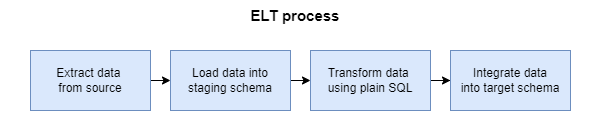
Data transformation
Use set-based processing
Processing data as data sets is more efficient than row-based processing. When you transform data as data sets, the process is as follows:
-
Identify possible error cases
-
Check all rows and set error codes as needed
-
Integrate all valid rows into the target tables
Any invalid data can optionally be kept in the staging area for further processing.
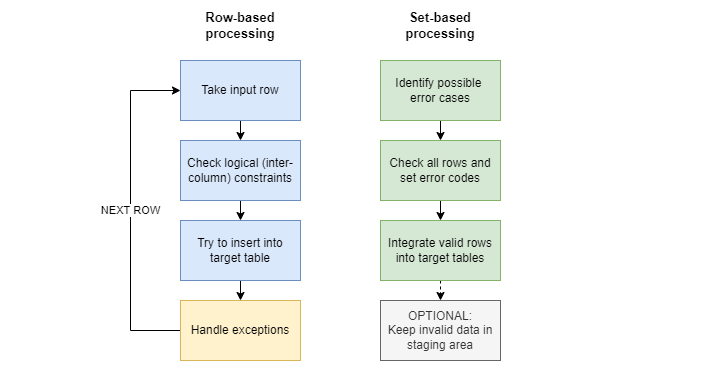
Primary key constraint check
Since Exasol does not support cursors, the best practice is to execute all checks on the data within the staging area, and then integrate only the transformed and checked data into the target schema.
In the following example, we have a fact table SALES_POSITIONS with primary keys SALES_ID and POSITION_ID and the foreign key SALES_ID, and a staging table SALES_POS_UPDATE (which only includes the relevant columns). Only new sales positions are transferred from the staging table to target schema, while invalid entries remain in the staging table with an appropriate error message.
Example (set-based approach):
UPDATE STG.SALES_POS_UPDATE su
    SET error_text='SALES_ID already exists'
    WHERE EXISTS
    (
        SELECT 1 FROM RETAIL.SALES_POSITIONS s
        WHERE s.SALES_ID = su.SALES_ID
    )
;

INSERT INTO RETAIL.SALES_POSITIONS
    (
        SELECT SALES_ID, POSITION_ID, ARTICLE_ID, AMOUNT, PRICE, VOUCHER_ID, CANCELED
        FROM STG.SALES_POS_UPDATE su
        WHERE su.ERROR_TEXT IS NULL
    )
;

DELETE FROM STG.SALES_POS_UPDATE
    WHERE error_text IS NULL
;
The staging table can here contain not only new entries but also updates of existing rows.
Hence, the sales positions that are removed from the SALES_POSITIONS table in the previous example may also exist in the staging table.
To prevent this, omit the primary key constraint check and use a MERGE statement instead of the INSERT statement.
Example:
MERGE INTO RETAIL.SALES_POSITIONS s
    USING STG.SALES_POS_UPDATE su
    ON s.SALES_ID = su.SALES_ID
    AND s.POSITION_ID = su.POSITION_ID
    WHEN MATCHED THEN UPDATE SET s.VOUCHER_ID = su.VOUCHER_ID
    WHEN NOT MATCHED THEN INSERT VALUES
    (SALES_ID, POSITION_ID, ARTICLE_ID, AMOUNT, PRICE, VOUCHER_ID, CANCELED)
;
Use IMPORT and EXPORT
Exasol provides the integrated SQL commands IMPORT and EXPORT to exchange data with many different types of systems without the need for a separate bulk loading tool. You can integrate data from flat files, databases, Hadoop, or any type of data source. You can also write your own connectors using ETL UDFs.
How to achieve optimal parallelization:
-
If you import from an Exasol database, importing is always parallelized. Loading tables directly will then be significantly faster than using the
STATEMENToption. -
If you import data from Oracle sources, partitioned tables will be loaded in parallel.
-
If you import data from JDBC or Oracle sources, specifying multiple
STATEMENTclauses will allow them to be executed in parallel, which may improve performance compared to loading all data as a singleSTATEMENT. You can only specify multiple statements for JDBC and Oracle sources.
For more information, see Load data.
Transactions
Use bulk insert
To enhance the performance of data insertion, group multiple rows in a single multi-row INSERT statement. Choose the largest possible bulk size.
Avoid small data inserts
Avoid small data inserts, especially single-row IMPORT or INSERT. A multi-row insert is normally faster than multiple single-row inserts.
Avoid multiple inserts
Avoid multiple INSERT statements into the same table, use IMPORT instead.
Multiple INSERT statements from different sessions done simultaneously on the same tables will very likely lead to transaction conflicts. You may also receive the WAIT FOR COMMIT message and experience further delays.
Prefer IMPORT over INSERT
Using the IMPORT statement will generally result in better performance than using INSERT unless you are loading a very small amount of data (100 rows or less). When loading larger amounts of data, IMPORT is normally faster.
See also Use IMPORT and EXPORT.