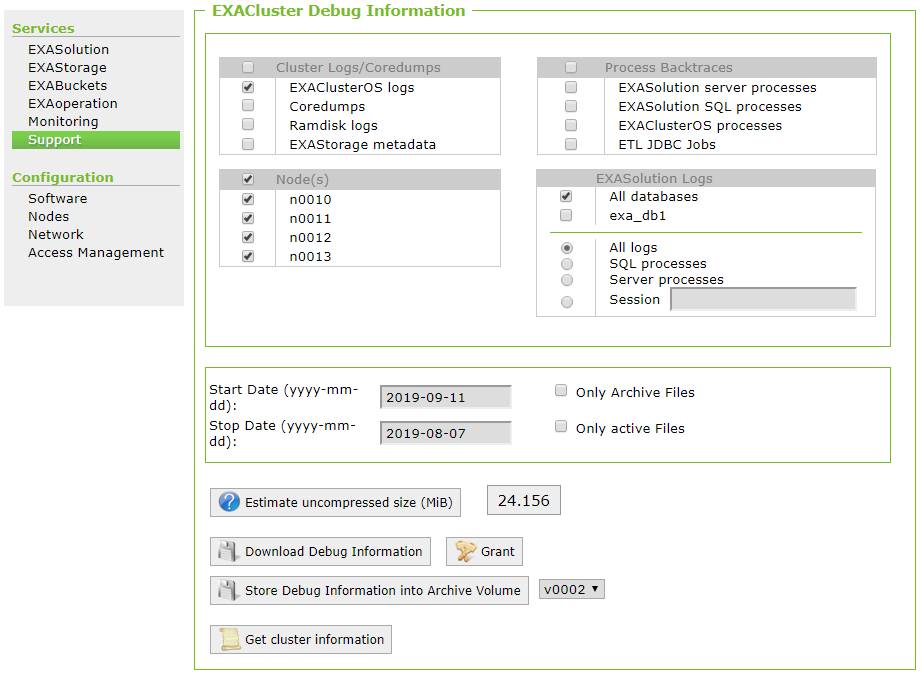
Cluster Logs
Learn how to collect cluster logs on your Exasol system.
If you are experiencing general issues with the cluster operating system, you need to provide the EXAClusterOS logs. Follow these steps to get the log files:
- Open EXAoperation and go to Services > Support.
- Set up the options on the EXACluster Debug Information screen as follows:
- In Cluster Logs/Coredumps, select EXAClusterOS logs.
- InProcess Backtraces, leave all options unchecked.
- In Node(s), select all nodes
- In EXASolution Logs, select All databases and All logs.
- Set the start and stop dates for the day the issue occurred
- Click on Download Debug Information to download the file locally, or click on Store Debug Information into Archive Volume to save the file to a remote server.
- Attach the downloaded file to your support ticket.