Get All Logs
Learn how to collect all logs and information for a support case in a single operation.
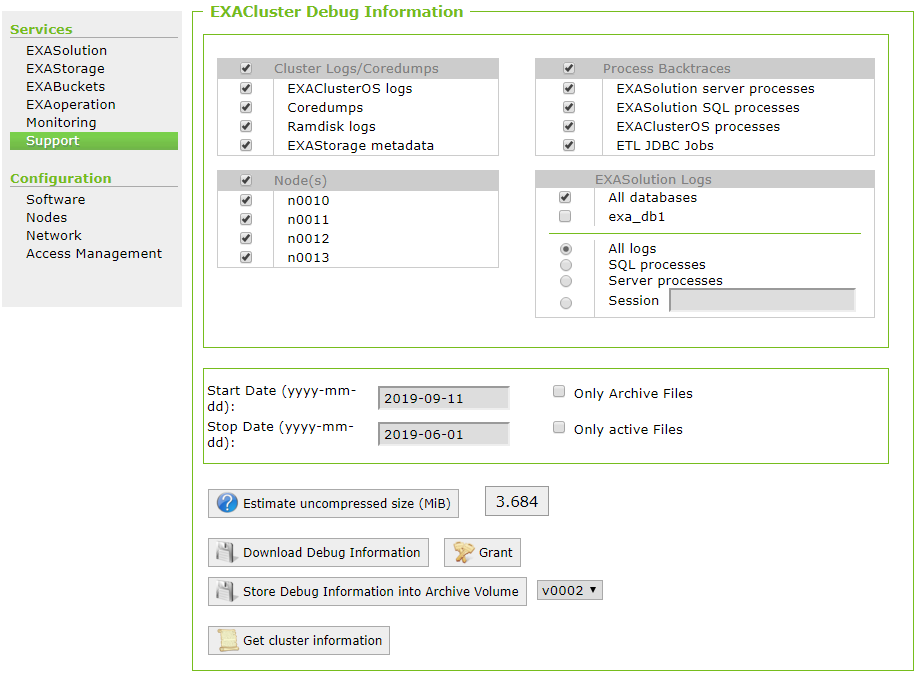
In certain scenarios you may need to enable all the logs and send them to Support. Follow the steps below to enable all logs:
- Open EXAoperation and go to Services > Support.
- Set up the options on the EXACluster Debug Information screen as follows:
- In Cluster Logs/Coredumps, select all options.
- In Process Backtraces, select all options.
- In Node(s), select all nodes.
- In EXASolution Logs, select All databases and All logs.
- Set the start and stop dates for the day the issue occurred.
- Click on Download Debug Information to download the file locally, or click on Store Debug Information into Archive Volume to save the file to a remote server.
- Attach the downloaded file to your support ticket.