Table Operators - UNION [ALL], INTERSECT, MINUS
Purpose
To combine the results of several queries you can use table operators.
| Table operator | Meaning |
|---|---|
UNION ALL
|
Union from both subqueries. All of the rows from both operands are taken into account. |
UNION
|
The set union from both subqueries without duplicates. All of the rows from both operands are taken into account. Duplicate entries in the result are eliminated. |
INTERSECT
|
The intersection from both subqueries without duplicates. All of the rows that appear in both operands are accounted for in the result. Duplicate entries in the result are eliminated. |
MINUS or EXCEPT |
The set difference from both subqueries without duplicates. The result comprises those rows in the left operand that do not exist in the right operand. Duplicate entries in the result are eliminated. |
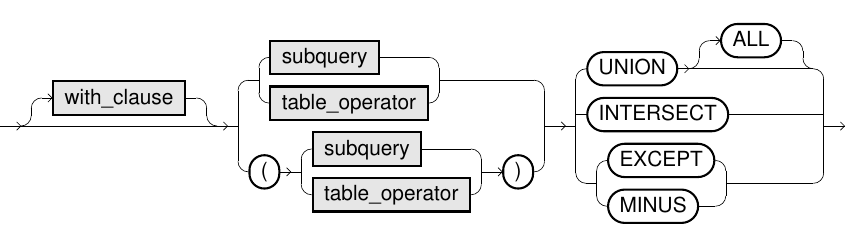
Syntax

Usage notes
-
Table operators (except
UNION ALL) are expensive operations and can lead to performance problems, in particular with very large tables. This is primarily because the result must not contain duplicates, and removing duplicates is expensive. -
The number of columns of both operands must match, and the data types of the columns of both operands must be compatible.
-
The names of the left operand are used as columns name for the result.
-
Several table operators can be combined. In this respect,
INTERSECThas higher priority thanUNION [ALL]andMINUS. WithinUNION [ALL]andMINUS, evaluation is performed from left to right. We recommend using parentheses for clarity even when not required. -
The keyword
EXCEPTcomes from the SQL standard,MINUSis an alias. Exasol supports both alternatives. -
The
WITHclause, which declares a Common Table Expression (CTE), applies to both table operands of the table operator.If a subquery or nested table_operator has a
WITHclause then the subquery of nestedtable_operatormust be in parentheses. The scope of theWITHclause will apply to that operand only. -
The
ORDER BYandLIMITclause apply to the whole result set of the table operator.If a subquery or nested table_operator has an
ORDER BYorLIMITclause then the subquery of nestedtable_operatormust be in parentheses. TheORDER BYorLIMITwill apply to that operand's result set only.
The WITH, ORDER BY, and LIMIT clauses are only supported in Exasol 2026.1.0 and later.
Examples
SELECT * FROM t1;| I1 | C1 |
|---|---|
| 1 | abc |
| 2 | def |
| 3 | abc |
| 4 | abc |
| 5 | xyz |
SELECT * FROM t2;| I2 | C2 |
|---|---|
| 1 | abc |
| abc | |
| 3 | |
| 4 | xyz |
| 5 | abc |
(SELECT * FROM t1) UNION ALL (SELECT * FROM t2);| I1 | C1 |
|---|---|
| 1 | abc |
| 2 | def |
| 3 | abc |
| 4 | abc |
| 5 | xyz |
| 1 | abc |
| abc | |
| 3 | |
| 4 | xyz |
| 5 | abc |
(SELECT * FROM t1) UNION (SELECT * FROM t2);| I1 | C1 |
|---|---|
| 1 | abc |
| 3 | abc |
| 4 | abc |
| abc | |
| 2 | def |
| 4 | xyz |
| 3 | |
| 5 | abc |
| 5 | xyz |
(SELECT * FROM t1) INTERSECT (SELECT * FROM t2);| I1 | C1 |
|---|---|
| 1 | abc |
(SELECT * FROM t1) MINUS (SELECT * FROM t2);| I1 | C1 |
|---|---|
| 3 | abc |
| 2 | def |
| 4 | abc |
| 5 | xyz |
(SELECT * FROM t1) UNION ALL (SELECT * FROM t2) ORDER BY I1, C1 LIMIT 4;|
I1 |
C1 |
|---|---|
|
1 |
abc |
|
1 |
abc |
|
2 |
def |
|
3 |
abc |
(SELECT * FROM t1 ORDER BY I1, C1 LIMIT 4) UNION ALL (SELECT * FROM t2);|
I1 |
C1 |
|---|---|
|
1 |
abc |
|
2 |
def |
|
3 |
abc |
|
4 |
abc |
|
1 |
abc |
|
|
abc |
|
3 |
|
|
4 |
xyz |
|
5 |
abc |
(SELECT * FROM t1) UNION ALL (SELECT * FROM t2 ORDER BY I2, C2 LIMIT 4);|
I1 |
C1 |
|---|---|
|
1 |
abc |
|
2 |
def |
|
3 |
abc |
|
4 |
abc |
|
5 |
xyz |
|
1 |
abc |
|
3 |
|
|
4 |
xyz |
|
5 |
abc |
WITH t1 AS (SELECT 0 as X, 'nil' as Y)
(SELECT * FROM t1) UNION ALL (SELECT * FROM t2);|
X |
Y |
|---|---|
|
0 |
nil |
|
1 |
abc |
|
|
abc |
|
3 |
|
|
4 |
xyz |
|
5 |
abc |
(SELECT * FROM t1)
UNION ALL
(
    WITH t2 AS (SELECT 0 as X, 'nil' as Y)
    SELECT * FROM t2
);|
I1 |
C1 |
|---|---|
|
1 |
abc |
|
2 |
def |
|
3 |
abc |
|
4 |
abc |
|
5 |
xyz |
|
0 |
nil |
