ALTER SCHEMA
Purpose
Use this statement to alter a schema.
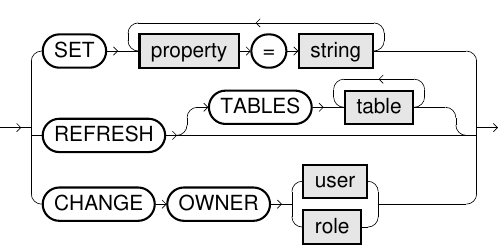
You can alter a schema in the following ways:
- Using the
CHANGE OWNERoption, you can assign a schema to another user or role. The schema and all its objects will then belong to the specified user or role. - You can set a schema quota with the
RAW_SIZE_LIMIToption. - For a virtual schema, you can change its properties or refresh its metadata.
Prerequisites
-
You need either the system privilege
USE ANY SCHEMAor the object privilegeUSAGEon the target schema, or the schema must be owned by you or one of your assigned roles. - Additional prerequisites for physical schemas:
- System privilege
ALTER ANY SCHEMA.
- System privilege
- Additional prerequisites for virtual schemas:
CHANGE OWNER: System privilegeALTER ANY VIRTUAL SCHEMA.SET: System privilegeALTER ANY VIRTUAL SCHEMA, object privilegeALTERon the schema, or the ownership of the schema by the current user or one of its user roles. Additionally, access rights are necessary on the corresponding adapt script.REFRESH: System privilegeALTER ANY VIRTUAL SCHEMAorALTER ANY VIRTUAL SCHEMA REFRESH, object privilegeALTERorREFRESHon the schema, or ownership of the schema by the current user or one of its roles. Additionally, access rights are necessary on the corresponding adapter script.


Usage notes
-
This command is not a part of the
SQLstandard. -
RAW_SIZE_LIMITimposes a limitation on the size of a schema (the sum of the raw data sizes in bytes of all the objects within the schema). This is similar to quotas within a file system.You can find the raw object sizes in the system table EXA_ALL_OBJECT_SIZES. The value
NULLindicates that there is no limit. -
REFRESHtriggers an update of the metadata of a virtual schema, that is, the underlying objects of the external data source.This update is only done explicitly by this statement, because doing this implicitly while querying the virtual schemas could lead to transaction conflicts for read-only transactions.
To learn about the virtual schema concept, see Virtual schemas.
Examples
ALTER SCHEMA s1 CHANGE OWNER user1;
ALTER SCHEMA s1 CHANGE OWNER role1;
ALTER SCHEMA s1 SET RAW_SIZE_LIMIT = 128*1024*1024;
ALTER VIRTUAL SCHEMA s2
  SET CONNECTION_STRING = 'jdbc:hive2://localhost:10000/default';
ALTER VIRTUAL SCHEMA s2 REFRESH;