Learn about the fail safety mechanisms in Exasol.
If the host of a cluster node fails, Exasol detects that the node is no longer available and triggers an automatic failover procedure. Provided that the volumes have been configured with redundancy, the metadata on each node is replicated to mirrors on neighboring nodes. This means that data integrity is automatically preserved on node failure.
Overview
The primary objective for the failover mechanism is data integrity. When configured correctly, the failure of a hardware component will not cause data loss or data corruption.
The hard drives of the cluster nodes are configured in RAID 1 pairs to compensate single disk failures without any interruptions. If the volumes are configured with redundancy level 2 (best practice and recommended by Exasol), each cluster node will also replicate data to a neighbor node.
The hot standby failover mechanism means that you have one or more reserve nodes standing by for the active nodes in your system. If a node fails, a reserve node immediately takes over for the failed node. The cluster operating system will automatically restart the necessary services on the new node provided that the corresponding resources (main memory, number of nodes, etc.) exist.
For more details, see Example with redundancy 2.
In AWS native cloud deployments you can also use cold standby, where Exasol automatically starts up a suspended node that takes over for the failed node. For more details, see Cold standby (AWS native).
-
To learn how to define reserve nodes, see Add reserve nodes.
-
To learn how to set redundancy when configuring volumes, see Volumes overview.
-
To learn more about business continuity planning, see Business continuity.
Example with redundancy 2
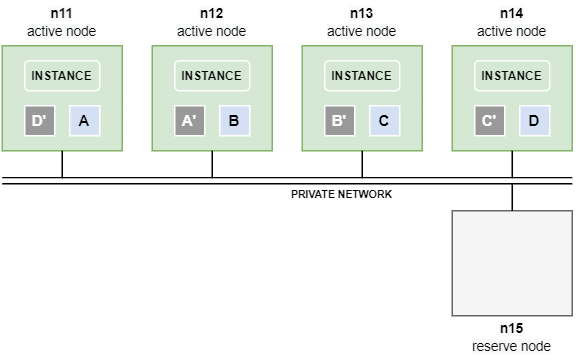
The following example shows an Exasol cluster with 4 active data nodes and one reserve node (4+1).
The volumes are configured with redundancy level 2, which means that each node contains a mirror of the data segments that are operated on by a neighbor node. For example, if node n11 modifies A, the mirror A‘ on the neighbor node n12 is synchronized over the private network.
What happens on node failure?
A node failure triggers the following automatic sequence of actions by the cluster operating system (COS):
- The node failure is detected.
- All affected databases on the cluster are stopped.
- The reserve node is activated and the failed node becomes a reserve node for the affected databases.
- All databases are restarted.
- Database connectivity is restored.
What happens next depends on whether the failed node comes back online within a specific timeout period (transient node failure) or if it does not come back (persistent node failure). In case of a transient node failure, a complete restore of data segments from mirrors to the new active node will not be required.
Persistent node failure
If the failed node n12 does not become available again before the timeout threshold is reached (the default value is 10 minutes), the segments A‘ and B that resided on the failed node are automatically copied to n15 – the former reserve node – using their respective mirrors A on n11 and B‘ on n13.
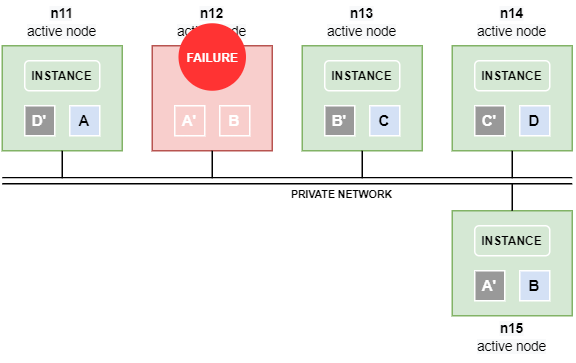
Data is automatically copied between the nodes over the private network. If the private network has been separated into a database network and a storage network, data is copied over the storage network.
Copying data between nodes is time consuming and can put a significant load on the private network.
In case of a persistent node failure we recommend that you add a new reserve node to replace the failed node.
Transient node failure
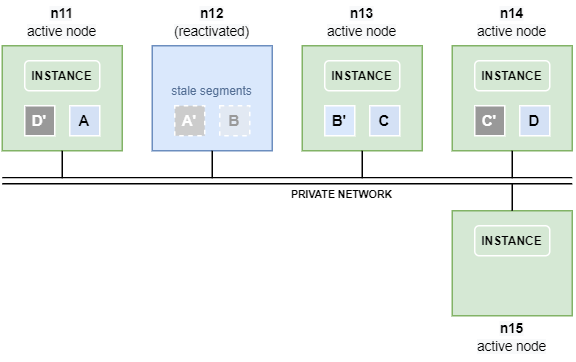
If the failed node n12 comes back before the timeout threshold is reached, a complete restore of the mirrors towards node n15 is not necessary and segments will not be copied between the nodes.
However, the segments A’ and B on node n12 are now stale, since their mirrors on nodes n11 and n13 have been operated on in the meantime. The segments therefore have to be re-synchronized before they can be used again.
Fast mirror re-sync
As soon as node n12 is back online, the stale segments are automatically re-synced by the cluster operating system, applying the changes on A and B‘ that were done on their respective mirrors while n12 was offline.
This activity is much faster and less load-intensive than a complete restore of segments towards node n15.
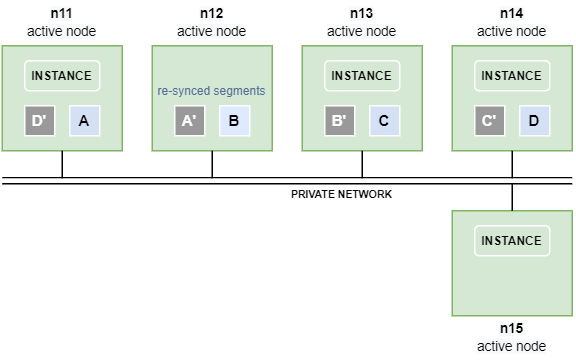
The instance on node n15 now works on the segments residing on node n12, until the database is restarted.
Restart the database
Restarting the database after a transient node failure will re-establish the initial scenario with n11–n14 as active nodes and n15 as reserve node.
Move data between nodes
Since restarting the database requires additional downtime, an alternative method that will not cause any downtime is to move data between the nodes using the ConfD job st_volume_move_node. For example:
confd_client st_volume_move_node vname: DATA_VOLUME_1 src_nodes: '[12]' dst_nodes: '[15]'In this case the segments residing on node n12 are moved to node n15.
Moving data is done over the private network. If the private network has been separated into a database network and a storage network, copying is done over the storage network.
Moving data between nodes is time consuming and can put a significant load on the private network.
Cold standby (AWS native)
The cold standby mechanism is an alternative on native cloud deployments on AWS. This is a slower but more cost effective solution than hot standby, since it does not require any additional active nodes.
Prerequisites
- Cold standby is only available in AWS native cloud deployments.
- The cluster must include at least one standby node in suspended mode.
- The smallest supported cluster configuration is 3 active nodes + 1 standby node (3+1). This is because cold standby requires that more than 50% of the active data nodes are available during an outage.
What happens on node failure
A node failure triggers the following automatic sequence of actions:
- All affected databases on the cluster are stopped.
- The failover mechanism tries to restart the failed node and bring it back online, then restarts the databases.
- If the failed node could not be restarted, the failover mechanism starts the standby node and brings it online.
- Database connectivity is restored.
- A background restore of data segments from mirrors to the new active node is started.
